



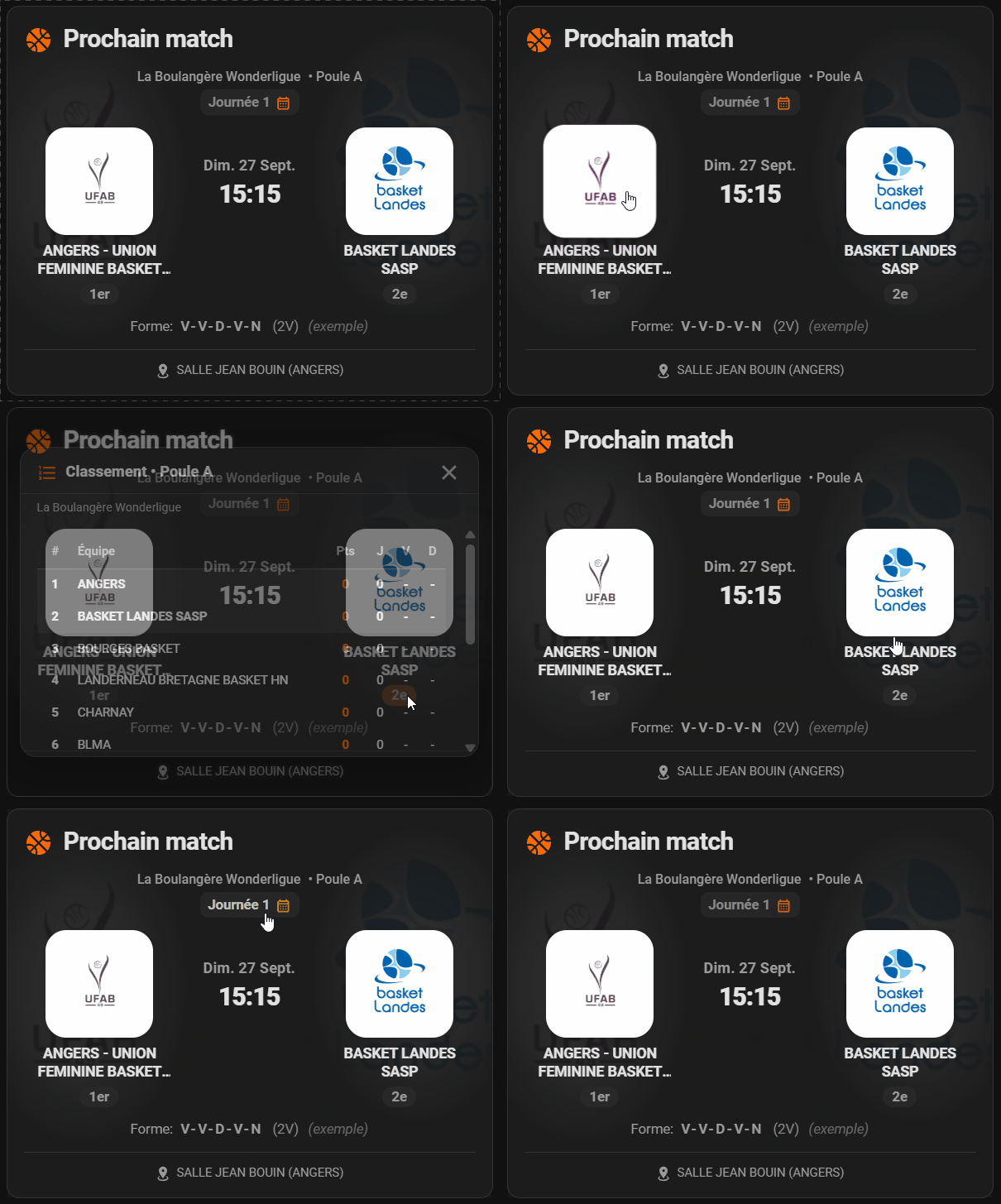
A modern and interactive Lovelace card for Home Assistant designed specifically to display fixtures, live scores, standings, and match statistics for your teams tracked with the FFBB Tracker integration.
Inspired by official sports broadcast layouts and optimized for fast glanceability on mobile devices as well as wall-mounted dashboard tablets.
If you find this project useful, you can support its development 🙏

- 🏀 Automatic Entity Resolution: Pick any single sensor belonging to the team (next match, pool, standings...), the card automatically detects and binds all related entities.
- 🔄 Dynamic Match Carousel: Step through every match of the season with the navigation chevrons (or tap a row of the season schedule to jump straight to it). Without a calendar, the chevrons toggle between the last and the next match.
- ⏱️ Adaptive Match Display:
- Pre-match: Day, date, and tip-off time, plus a "Game day" badge on the day of the match (a "Postponed" badge replaces it when the fixture is postponed).
- Post-match: Large final score display — your own team's number is bold and in the accent color so it's readable at a glance, the opponent's stays muted — plus a high-contrast solid outcome badge (Win, Loss, or Draw).
- Live: "Live" badge with pulsing white dot and kickoff time display.
- 🥇 Podium Rank Badges: Automatic visual highlight for Top 3 rankings (gold, silver, bronze) with customizable styles: subtle glowing outline (default), beveled metallic solid, or neutral without podium colors.
- 🎨 Configurable Accent Color: Use default basketball orange, your active Home Assistant theme primary color, or any custom HEX code to match your club's jersey colors.
- 🗺️ Direct GPS Navigation: Tap the venue to launch direct turn-by-turn routing in Google Maps.
- 📅 Add to Calendar: Tap the date to create a prefilled Google Calendar event with tip-off time, teams, and gym address.
- 🌐 Official Club Link: Tap team logos to open the team's official page on the FFBB portal (enabled by default).
- 📊 Built-in Interactive Modals:
- Full Standings: Tap rank badges (
1st,4th...) to inspect the complete pool standings table (points, played, wins, losses, draws) with team and opponent highlights. Each row shows the team's logo when the source sensor provides one (see the FFBB Tracker integration changelog). - Season Schedule: Tap the "Round" header to browse the ordered schedule of all pool matches with past scores and upcoming fixtures.
- Form Details: Tap the recent form sequence (e.g.
W-W-L-W-D) for match details and active streak counts.
- Full Standings: Tap rank badges (
- 🖼️ Watermark Logos: Background club logos rendered with a smooth elliptical radial mask to eliminate visible straight edges.
- ⚙️ Complete Visual Editor (
ha-form): Fully manageable through the Home Assistant UI, no mandatory YAML editing. - 🔒 100% Local & Secure: Zero external CDN calls - Lit is a tracked npm dependency, bundled in at build time.
Note
Logos and team links in the carousel. For each match, the card uses the logo and link carried by the matching row of the pool sensor's calendar attribute (home_logo, away_logo, home_url, away_url). When a row doesn't provide them, it falls back to the next and last opponent sensors if the club name matches, then to the standings (links only). Without any data, the default logo is shown rather than another club's logo.
Important
This card is a frontend display: it requires the FFBB Tracker integration to work.
- First, install and configure FFBB Tracker to generate your entities (
sensor.*). - Then, add this card to your Lovelace dashboard.
- Open HACS in Home Assistant.
- Click the top-right three dots > Custom repositories.
- Enter repository URL:
https://github.com/Adrien40/ha-ffbb-tracker-card - Select category Dashboard, then click Add.
- Click the FFBB Tracker Card entry that appears, then click Download.
- Refresh your browser cache (or reload Lovelace resources).
- Download the latest release assets from the Releases page.
- Verify that your installation contains all required files:
ha-ffbb-tracker-card.js(the bundled card, including the editor, Lit, and translations)- The
brand/folder, kept as a subfolder right next toha-ffbb-tracker-card.js(the card loads its fallback logo from there at render time)
- Copy all files into your
/config/www/community/ha-ffbb-tracker-card/directory. - In Home Assistant, go to Settings > Dashboards > Resources.
- Add a new resource:
- URL:
/local/community/ha-ffbb-tracker-card/ha-ffbb-tracker-card.js - Type: JavaScript Module
- URL:
- Restart or hard-refresh your browser.
- On your dashboard, click Edit Dashboard > Add Card.
- Search for FFBB Tracker Card.
- Select your team in the entity picker and customize visual options as needed.
type: custom:ffbb-tracker-card
entity: sensor.my_team_next_match_opponent
custom_team_name: Basket Landes
logo_size: medium
logo_click_action: team_url
accent_color: default
default_match_view: auto
show_title: true
title: ''
icon: mdi:basketball
show_header: true
show_rank: true
rank_badge_style: outline
display_mode: match
standings_title: ''
standings_icon: mdi:format-list-numbered
show_form: true
show_venue: true
show_watermark: true| Option | Type | Default | Description |
|---|---|---|---|
entity |
string |
Required | Any sensor entity created by the FFBB Tracker integration for the team. |
custom_team_name |
string |
"" |
Custom team label overriding official FFBB name (e.g., Buglose Pontonx). |
logo_size |
string |
medium |
Team logo size: small, medium, large, or extra_large. |
logo_click_action |
string |
team_url |
Action on logo click: team_url (official FFBB page), more-info (HA dialog), or none. |
default_match_view |
string |
auto |
Initial match view: auto (last match until D+1), next (always upcoming), or last (last match). |
accent_color |
string |
default |
Accent color source: default (basketball orange), theme (HA primary color), or custom. |
custom_accent_color |
string |
"" |
Custom HEX color code when accent_color: custom (e.g., #1e88e5). |
show_title |
boolean |
true |
Toggles the card title header. |
title |
string |
"" |
Custom title, shown as a prefix in front of the dynamic default that follows the match state ("Next match", "Live match", "Last match"). Leave blank to show just that dynamic default. |
icon |
string |
mdi:basketball |
Icon displayed beside the title. |
show_header |
boolean |
true |
Displays competition, pool name, and clickable round header. |
show_rank |
boolean |
true |
Displays interactive rank badges for each team. |
rank_badge_style |
string |
outline |
Rank badge visual style: outline (gold/silver/bronze border by default), solid (metallic fill), or none (neutral without podium colors). |
standings_popup_detailed |
boolean |
false |
Shows the full detailed table (same columns as the standalone standings card) in the popup opened from the rank badges, instead of the simple one (#, team, Pts, J G P N). |
display_mode |
string |
match |
Which card(s) to show: match (only the match card, as today), standings (only the standalone standings card), or both. The standings card shows the same columns as the official FFBB page: Pts, Games (J G P N), I, Pen., Forf., Def., Penalties (Ref / Coach) and Points (scored / conceded / difference) — only your own team is highlighted; on a narrow screen the table scrolls sideways with the rank and team columns pinned. If there is no standings data yet, the card still shows with a "no standings available" message instead of disappearing. With both, the table keeps a compact font size aligned with the popup, and the card's title reads at that same smaller size; with standings alone, both the table and the title read at the match card's normal size. The simple standings stays in the popup opened from the rank badges, unless standings_popup_detailed is turned on. |
standings_title |
string |
"" |
Custom title for the standalone standings card (defaults to translated "Standings" if left blank). Only used when display_mode is standings or both. |
standings_icon |
string |
mdi:format-list-numbered |
Icon displayed beside the standings card title. |
show_form |
boolean |
true |
Displays recent form streak indicator (last 5 games). |
show_venue |
boolean |
true |
Displays venue details with GPS navigation link in footer. |
show_watermark |
boolean |
true |
Shows faded team logo watermarks in background. |
show_calendar_logos |
boolean |
true |
Shows a small team logo per row in the season calendar modal. |
show_standings_logos |
boolean |
true |
Shows a small team logo per row in standings tables (popup and standalone standings card). |
- Remove the card from your dashboards: switch each affected view to YAML mode (or delete the card through the visual editor) and remove the corresponding
type: custom:ffbb-tracker-cardblock. - If installed via HACS: open HACS, find the FFBB Tracker Card entry (downloaded repositories are listed first, or use the search field), open its three-dots menu, then select Remove. HACS automatically removes the associated resource.
- If installed manually:
- Delete the
/config/www/community/ha-ffbb-tracker-card/folder. - Remove the corresponding resource under Settings > Dashboards > Resources.
- Delete the
- Refresh your browser (or force-reload Lovelace resources).
This card never creates any credentials, tokens, or external accounts -- there's nothing to revoke elsewhere.
The card is fully available in French 

If you would like to see the card translated into another language or contribute to a translation, feel free to open an issue or contact me directly on GitHub.
This project uses esbuild to bundle the card into a single self-contained file, and Vitest for unit tests.
git clone https://github.com/Adrien40/ha-ffbb-tracker-card.git
cd ha-ffbb-tracker-card
npm install

npm test         # Runs the unit tests
npm run lint     # Checks the code with ESLint
npm run build    # Generates dist/ha-ffbb-tracker-card.js
npm run watch # Rebuilds automatically while developingFor bug reports or feature requests, please open an Issue on this repository.
This project is licensed under the GPLv3. It is an independent, open-source project and is not officially affiliated with the French Basketball Federation (FFBB). Use of this software is at your own discretion.
Developed with ❤️ by @Adrien40