

- Introduction
- Supported platforms
- Dependencies
- Installation
- Usage
- Configuration
- Development notes
- Tests
- Release process
- Troubleshooting
- Contributing
- License
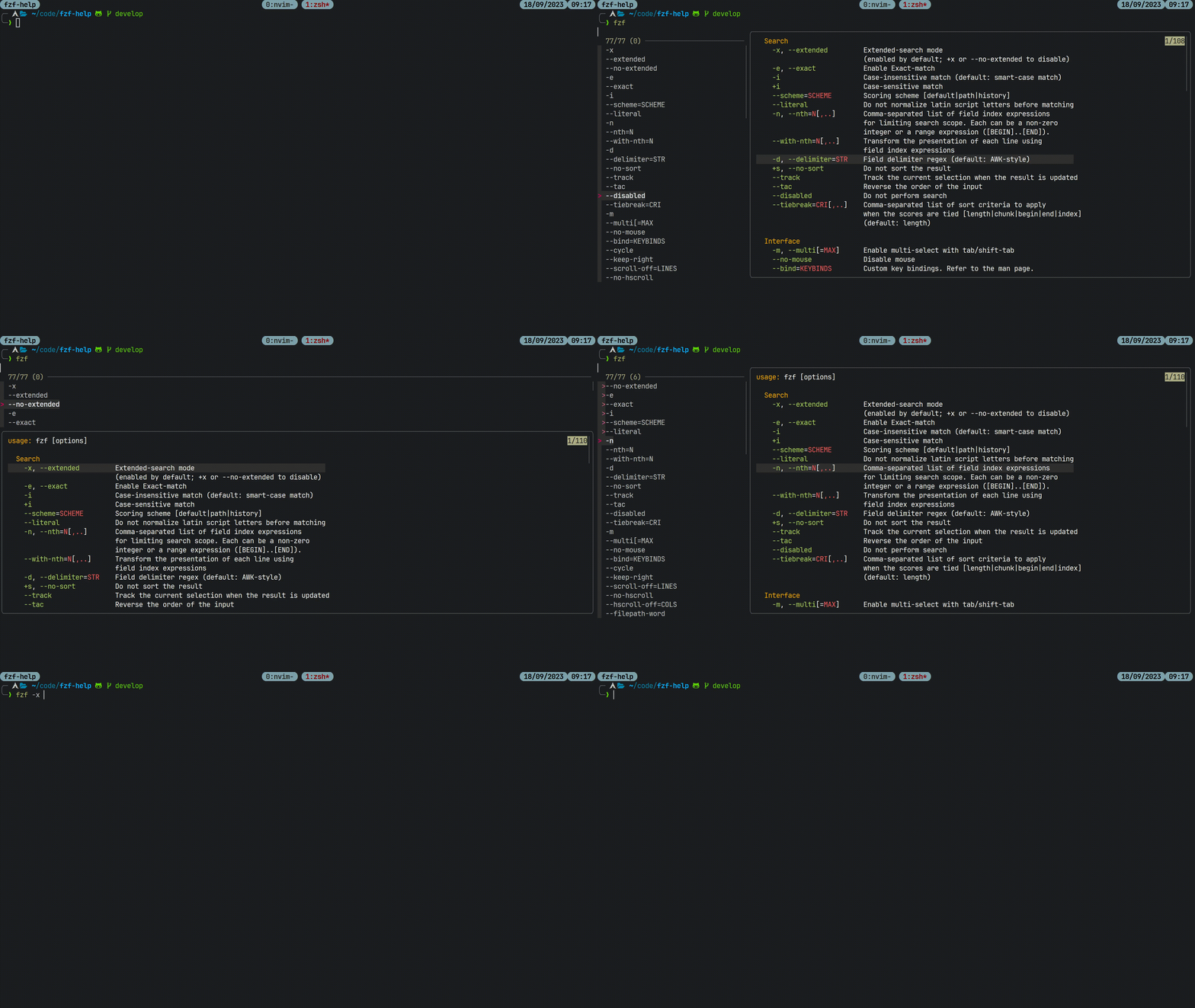
fzf-help is an fzf extension that allows you to select command line options
of a given command. The options are retrieved from the command its --help
documentation, which is displayed in a preview window. Zsh, bash, and fish are
supported.
Linux is the only tested platform.
On macOS, GNU grep must be available as ggrep or grep.
The project does not claim support for other platforms.
Install fzf. You can also install bat for syntax highlighting in the
preview window.
On Arch, you can install the required dependency with:
sudo pacman -S fzfYou can install the optional bat dependency with sudo pacman -S bat.
After installing the dependencies, run the following bash command to install
fzf-help in the /usr/share/fzf-help directory:
bash -c 'tmp_dir=$(mktemp -d); GIT_LFS_SKIP_SMUDGE=1 git clone https://github.com/BartSte/fzf-help.git $tmp_dir; $tmp_dir/install; rm -rf $tmp_dir;'The following sections describe how to setup the key bindings for the supported shells.
After installation, add the following to your .zshrc file:
source /usr/share/fzf-help/fzf-help.zsh
zle -N fzf-help-widget
bindkey "^A" fzf-help-widget
which will bind the fzf-help-widget to the ctrl-a, which you should trigger
after typing the command you want to get help for.
After installation, you can add the following to your .bashrc file:
source /usr/share/fzf-help/fzf-help.bash
bind -x '"\C-a": fzf-help-widget'
which will bind the fzf-help-widget to the ctrl-a, which you should trigger
after typing the command you want to get help for.
After installation, you can add the following to your
~/.config/fish/config.fish file:
source /usr/share/fzf-help/fzf-help.fish
bind \ca fzf-help-widget
which will bind the fzf-help-widget to the ctrl-a, which you should trigger
after typing the command you want to get help for.
Run the following command to install fzf-help in the
$HOME/.local/share/fzf-help directory. Use this if you do not have root
access.
bash -c 'tmp_dir=$(mktemp -d); git clone https://github.com/BartSte/fzf-help.git $tmp_dir; $tmp_dir/install --user; rm -rf $tmp_dir;'If you use zsh, add the following to your .zshrc file:
source $HOME/.local/share/fzf-help/fzf-help.zsh
zle -N fzf-help-widget
bindkey "^A" fzf-help-widgetIf you use bash, you can add the following to your .bashrc file:
source $HOME/.local/share/fzf-help/fzf-help.bash
bind -x '"\C-a": fzf-help-widget'If you use fish, you can add the following to your
~/.config/fish/config.fish file:
source $HOME/.local/share/fzf-help/fzf-help.fish
bind \ca fzf-help-widgetThe package managers specified below will install fzf-help as root. To
configure the key bindings, follow the instructions in the Manual as
root section for your shell.
You can install fzf-help from the AUR using for example yay:
yay -S fzf-helpAs the demo shows, you can use fzf-help by typing ctrl-a after typing the
command you want to get help for. This will open fzf with a list of options
and the --help documentation in the preview window. You can press ctrl-a
again to toggle the preview window to the bottom or the right of the widget.
This is useful when you do not like page wrapping.
The default extractor supports common Unix option names:
- A short name uses one hyphen and one supported ASCII character. Examples
include
-h,-0,-?, and-.. - A long name uses two hyphens. It can contain ASCII letters, digits, hyphens,
and underscores. Examples include
--helpand--dry-run. - The U+2010 hyphen also works. A name cannot mix ASCII and U+2010 hyphens.
The extractor returns only the option name. For example, --color=WHEN
returns --color, and --backup[=CONTROL] returns --backup.
The extractor ignores ambiguous forms such as -abc, -j8, and
-I/usr/include. Set CLI_OPTIONS_CMD if a command uses a different option
grammar.
The following environment variables can be set to configure the behaviour of
fzf-help:
-
FZF_HELP_OPTS: arguments to pass tofzfwhen you select options. Put one argument on each line. This format keeps spaces in an argument. The default value is:export FZF_HELP_OPTS=$'--multi\n--layout=reverse\n--preview-window=right,75%,wrap\n--height\n80%\n--bind\nctrl-a:change-preview-window(down,75%,nowrap|right,75%,nowrap)'
For example, use
--prompt=Select an optionon one line to set a prompt that contains spaces.A value with no newline uses the legacy space-separated format.
-
FZF_HELP_SYNTAX: set this variable to configure thebat --language=option. It defaults totxt. If you usebatversion 0.21 or higher, you can set this variable to:export FZF_HELP_SYNTAX='help'
to get syntax highlighting for the
--helpdocumentation. Older versions ofbatdo not support this syntax highlighting, therefore the default istxt. -
HELP_MESSAGE_CMD: controls the command that gets help text. By default,fzf-helpruns the selected command with--help. If you set this value,fzf-helpevaluates it as trusted Bash code. The$cmdvariable contains validated command text. It can include an executable path or subcommands. For example, set it toman -P cat "$cmd"to use man pages. -
HELP_MESSAGE_RC: set this environment variable to a file you want to be sourced before getting the help message. Typically, this file will contain functions for which you want to get help. The file is trusted Bash code. When this variable is set, alias expansion is enabled forHELP_MESSAGE_CMD. -
CLI_OPTIONS_CMD: set this environment variable to the command you want to use to retrieve the command line options. When defining the command, ensure that the output is in the form of: the line number on which the option was found, a colon, and the name of the option (including the leading dashes). For example:line-number:--option1 line-number:--option2 line-number:--option3
where
line-numberis used to highlight the line in the fzf preview window. The default command is:grep -o --line-number -P -- $REwhere
$REis the regular expression that is used to match the command line options. You can also add this to your custom command by adding$REin your command. This value is trusted shell code. For example, if you want to useaginstead ofgrep, you can setCLI_OPTIONS_CMDto:export CLI_OPTIONS_CMD='ag -o --numbers -- $RE'
See Default option extractor for the complete grammar and boundary rules.
-
FZF_HELP_LOG_PATH: the preferred path to the log file. It takes precedence overFZF_HELP_LOG. The default is~/.local/state/fzf-help.log. -
FZF_HELP_LOG: the deprecated path to the log file. This variable remains supported for compatibility. -
FZF_HELP_LOG_LINES: the number of lines to keep in the log file. Defaults to10000.
src/cli-options scans the complete help message with a GNU grep PCRE. It
reports each match as line-number:name. Repeated matches remain in the
output, and each match keeps its source line number.
The source assembles the PCRE from named boundary, long-name, and short-name parts. This expanded expression has the same behavior:
(?x)
(?<![A-Za-z0-9_‐-])
(?:
  (?:--|‐‐)[A-Za-z0-9][A-Za-z0-9_-]*
  |
  (?:-|‐)[A-Za-z0-9?.:#@~]
)
(?=
  $
  | \s
  | [\[\](){}<>=\x27\x22\x60]
  | [,;:.!?](?=$|\s|[-‐\])}>\x27\x22\x60])
  | [/|](?=[-‐])
)
The escapes \x27, \x22, and \x60 represent an apostrophe, a quotation
mark, and a backtick.
| Form | Prefix | Name rule |
|---|---|---|
| Short | - or ‐ |
Exactly one character from [A-Za-z0-9?.:#@~] |
| Long | -- or ‐‐ |
[A-Za-z0-9][A-Za-z0-9_-]* |
The two U+2010 forms preserve compatibility with the earlier extractor. Mixed hyphen forms are not valid.
The long-name rule permits ASCII letters, digits, hyphens, and underscores. The first name character must be an ASCII letter or digit.
The character before an option cannot be an ASCII letter, a digit, an underscore, an ASCII hyphen, or a U+2010 hyphen. This rule rejects matches in words and longer hyphen sequences.
The start of a line is a valid left boundary. Other punctuation characters are also valid left boundaries.
One of these boundaries must follow the option name:
- The end of the line or a whitespace character.
- A square, round, curly, or angle bracket.
- An equals sign, an apostrophe, a quotation mark, or a backtick.
- Terminal punctuation:
,,;,:,.,!, or?. - A slash or pipe before another hyphen-prefixed option.
Terminal punctuation needs an additional boundary. The next character must be the line end, whitespace, a supported hyphen, a closing bracket, or a quote.
These rules support aliases such as -h/--help and -h|--help. They reject a
partial match from --dotted.name, --name+value, or -I/usr/include.
| Help text | Extracted names |
|---|---|
--x |
--x |
--3way |
--3way |
--dry-run |
--dry-run |
--foo_bar |
--foo_bar |
--color=WHEN |
--color |
--backup[=CONTROL] |
--backup |
--file FILE |
--file |
-a, -Z, -0 |
-a, -Z, -0 |
-?, -., -:, -#, -@, -~ |
The same short names |
-o=FILE |
-o |
-F: |
-F |
-h, --help |
-h, --help |
[-h] |
-h |
`--help` |
--help |
-F: returns -F because the terminal colon is punctuation. The extractor
does not return argument text.
The default PCRE ignores these complete forms. It does not return a valid-looking prefix from them.
| Category | Examples |
|---|---|
| Markers and incomplete names | --, -, ---help, word--option |
| Groups and multi-digit names | -abc, -46Aa, -OO, -10 |
| Attached values | -j8, -A2, -DNAME, -I/usr/include |
| Single-hyphen long names | -verbose, -name, -classpath |
| Other grammars | -XX:+UseG1GC, +f, ++foo, /help |
| Other dash characters | —help, −h |
| Other name characters | --log.level, --name+value, --naïve, -é |
| Text formatting | Names with ANSI escapes or line continuations |
The PCRE does not decide if matched text declares an option. For example, it
also matches -1 in prose and --help in a URL path.
The PCRE does not decide if an option accepts a value. It returns only the matched name.
-abc has several possible meanings. It can be a group, a single-hyphen long
name, or -a with an attached value. The default PCRE ignores this ambiguity.
Set CLI_OPTIONS_CMD for Windows-style, Java-style, or application-specific
option grammars. The custom command can use $RE, replace it, or use another
parser.
| Input category | New result | Classification |
|---|---|---|
[=VALUE] long arguments |
Return the name before [ |
Correction |
=VALUE long arguments |
Return the name before = |
Correction |
| Numeric and supported punctuation short names | Return the complete name | Correction |
| Groups and attached short values | Return no match | Intentional scope limit |
| Single-hyphen long names | Return no match | Intentional scope limit |
| Dotted, Unicode, and other long names | Return no match | Intentional scope limit |
Each fzf-select-option session creates one temporary help-message file. The
preview process reads this file. The selector removes the file when fzf exits.
A standalone help-message <cmd> call uses a temporary file only while the
command runs. It does not preserve a cache. A standalone help-message call
with no command prints no previous help message.
Install bat before you run the tests.
Install the Git submodules before you run the tests:
git submodule update --init --recursiveRun all tests:
./bats testThe ./bats file runs ./test/bats/bin/bats.
For more information, see the bats-core documentation
- Make the release changes on
develop. - Update
CHANGELOG.mdfor the next version. - Merge
developintomain. - Create a
vX.Y.Ztag onmain. - Push the tag.
- The release workflow publishes an AUR package from this tag.
If you encounter any issues, please report them on the issue tracker at: fzf-help issues.
Please note that fzf-help is tested on Linux only.
Contributions are welcome! Please see CONTRIBUTING for more information.
Distributed under the MIT License.