🇬🇧 English · 🇫🇷 Français



pip install robotframework-sapfxPyPI ships the libraries (the three channels below). The complete toolkit (recorders, rf-mcp/MCP integration, test agents, business resources) ships as the Windows deployment pack attached to each GitHub Release; see Install.
SAPFX is a SAP test-automation solution for Robot Framework (distribution
robotframework-sapfx): not a single library, but a set of tools designed
together around the whole life of a SAP test: writing, recording, generating,
running, healing, watching. Its core is one business vocabulary across three
channels:
SapEccLibrary(phase 1): SAP GUI thick client (ECC, S/4HANA backend), a hardened fork of robotframework-sapguilibrary (Apache 2.0), over COM.SapFioriLibrary(phase 2): SAP Fiori / S/4HANA web (SAPUI5), over Playwright (Browser library) with UI5-stable control selectors (no dynamic-id churn): role/property matching and a hierarchical UI5 XPath engine (//Table//Button[@text='Edit']), plus a WebGUIsidengine for classic SAP GUI for HTML pages and a Web Components engine forui5-*pages without a classic UI5 runtime. The locator engine is ported from playwright-sap (Apache-2.0).SapApiLibrary: the API channel (stdlib-only): OData v2 and v4 behind one keyword set (incl. the SAP CSRF protocol), optional RFC via pyrfc. Prepare and cross-check data through the API; drive the screen only for what you actually test; see the cross-paradigm flagship suite (tests/robot/flagship_cross_paradigm.robot: SE16 count == OData$counton the same live system).
A test reads the same whichever channel it drives. See docs/architecture.md and docs/fiori-architecture.md.
📖 Keyword documentation: one reference page per library, every keyword with its arguments and examples.
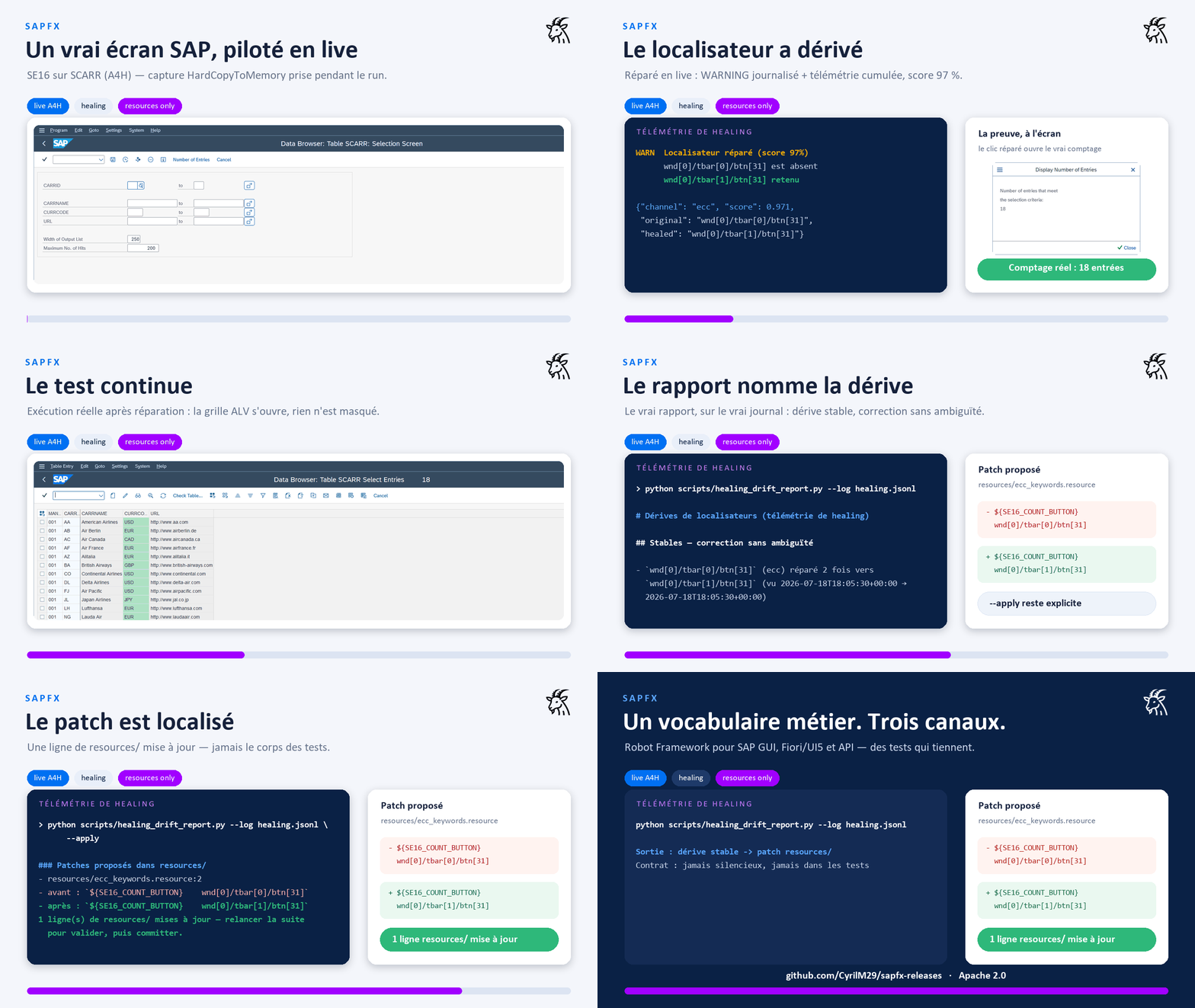
Everything above is real: screens captured on a live system (A4H) while the
library drives it, a stale locator healed mid-run (score 97 %), the real SE16
count, the real drift report. The important bit: healing is never silent. A
runtime WARNING becomes cumulative telemetry, then
scripts/healing_drift_report.py locates the patch to make in resources/
without changing business tests.
sapfx-project-presentation.mp4
3 min 20: VS Code and the business keywords, then SAP GUI, Fiori and the API channel driven live, and an MCP agent generating a suite from a real session.
The libraries are the execution core. Around them, each need of a SAP test project has its tool in the same box: same business vocabulary, same locator engines, same conventions everywhere:
What ships where.
pip install robotframework-sapfxgives you the three libraries and every keyword documented below. Items tagged (pack) are not Python packages: they live in this repository and in the Windows deployment pack. See Install for the two channels.
| Need | Tool in the box |
|---|---|
| Write readable tests | the three libraries + the resources/ business-keyword layer (pack): tests contain no raw SAP ids (a convention enforced by CI) |
| Capture an existing flow | two recorders (pack): desktop SAP GUI (native-event engine, GUI launcher) and web Fiori/UI5 (Chrome MV3 extension), exporting resource-first suites, spec drafts and replayable recordings |
| Generate and repair tests with AI, under control | the rf-mcp (MCP) integration and the plan → generate → heal agents (pack): every generated step is executed live before being written, and the healer patches resources/, never the tests |
| Watch screens without writing a scenario | the drift sentinel: perception and visual-baseline keywords ship with the libraries, the ready-made watch suite (pack) |
| Turn locator drift into preventive maintenance | healing telemetry (in the libraries) feeding healing_drift_report.py (pack), which locates the patch to make in resources/ |
| Provision a test workstation | the Windows deployment pack: the full install (see Install) |
That overall view is the point: recording, generation, execution, healing and watching all speak the same business keywords, so what one tool produces, the others can maintain.
wdi5 is the reference for UI5 end-to-end testing outside Robot Framework (UI5-community project, WebdriverIO-based, actively maintained). This project is not a wdi5 replacement and does not try to be one. The positioning is different: SAP test automation in Robot Framework, where the SAP GUI desktop client, the OData/RFC API channel and Fiori/UI5 share one business vocabulary, one runner and one report.
- Your stack is JS/WebdriverIO and your scope is a UI5 app → wdi5 is the natural choice.
- Your stack is Robot Framework, or your scenario spans the desktop client, APIs and Fiori in the same run → that is what this project is for.
Details in docs/fiori-architecture.md (§ “Why not Selenium / raw CSS / wdi5”).
The upstream library is a solid base with good keyword coverage (including ALV
grids). This fork keeps all of it and adds the things production SAP automation
needs (see the full audit). Everything below is a
keyword you get from pip install robotframework-sapfx, except the items
tagged (pack), which are tools shipped with the repository and the Windows
deployment pack:
- Real synchronisation instead of fixed
sleeps:Wait Until Busy Done,Wait Until Element Present,Wait Until Element Value Is. - Autonomous bootstrap:
Open Sap Logonlaunches the Logon Pad and waits for the scripting engine;Connect To Session With Retry;Close Sap Logon. - Locale-independent
Run Transaction(reads the status-bar message type, not English/Dutch/German text) +Status Message Should Be Success. - ALV grids by column title:
Get Cell Value By Column Title,Read Grid(→ list of dicts),Get Column Id By Title. - Screen perception:
Get Screen Signature(ECC) andGet Ui5 Page Tree(Fiori): a read-only text/XML view of the live screen, for locator debugging and AI-agent integration. Both supportmode=diff(only what changed since the previous perception). - Scripting preflight & telemetry (ECC):
Scripting Should Be Fully Enabledfails early with the exact RZ11 parameter to fix;Enable Test Tool Mode,Get Session Telemetry. - Locator healing, never silent: failures suggest the closest ids on screen
(scored);
Resolve Element With Healing(ECC) andResolve Ui5 With Fallback(Fiori: role→xpath→sid→wc chain) repair a stale locator with a logged WARNING, feeding an opt-in telemetry journal (SAPFX_HEALING_LOG) thatscripts/healing_drift_report.py(pack) turns into preventive maintenance (stable drifts located inresources/, patch proposed,--applyexecutes). - Human locators (ECC, ported from RoboSAPiens with a stricter policy):
Find/Fill/Read Field By Label,Click Button By Label: visible label + geometry, grid positions (N @ Label/Label @ N), scoped anchor (Anchor >> Rest, tunablescope_radius); ambiguity always reported with candidates, never a silent first match. - Visual assertions (ECC):
Screen Should Match Baseline(perceptual dHash over in-memory screenshots, snapshot semantics): pixel-level coverage for exactly what the Scripting API cannot see (opaque GuiShell lists, record-only charts). Optionalvisualextra (Pillow). - Embedded WebView2 bridge (ECC):
Switch To Embedded Browser Pagehands a WebView2 control embedded in a SAP GUI/Business Client window to the Browser library over CDP: both channels in one suite. - Launchpad iframes & Fiori Elements:
Set Ui5 Framefor Work Zone/cFLP apps embedded in a (cross-origin) iframe; stableidSuffix=fe::…selectors. Multi-version UI5: 1.60 → 2.0 nightly, proven live. - Recorders (pack), not just spies: desktop (
tools/recorder: highlight, click-to-capture, hover,--recordreplayable keyword sequences with a native event engine (exact buttons/grids/trees via the Scripting API'sChangeevents, automatic polling fallback); Tkinter launcher + rootrecorder.cmd) and web (tools/recorder_web: snippet and a Chrome MV3 extension that exports a*** Test Cases ***body, incl. value assertions and iframe support). No third-party tracker. - rf-mcp (RobotMCP) integration (pack) (
integrations/robotmcp/):SapEccPlugin/SapFioriPluginplug into the rf-mcp server: keyword routing, SAP selector guidance, and live screen perception for AI agents. Validated end-to-end against a live A4H system and a live UI5 page.
src/SapEccLibrary/          # phase 1: SAP GUI thick client (COM)
  _vendor/sapgui_base.py    #   upstream, vendored verbatim (class renamed only)
  keywords/_connection.py   #   bootstrap mixin (Logon Pad, retry, CoInitialize)
  keywords/_waits.py        #   synchronisation mixin (+ closest-match hints)
  keywords/_grid.py         #   ALV ergonomics mixin
  keywords/_perception.py   #   Get Screen Signature (mode=diff) + screenshots
                            #   + visual assertions (perceptual-hash baselines)
  keywords/_diagnostics.py  #   scripting preflight + TestToolMode + telemetry
  keywords/_healing.py      #   Resolve Element With Healing (logged, never silent)
  keywords/_semantic.py     #   human locators (label + geometry, grids, >> scope)
  keywords/_embedded_browser.py  # WebView2/CDP bridge to the Browser library
  SapEccLibrary.py          #   composes them + locale-safe Run Transaction
src/SapFioriLibrary/        # phase 2: Fiori / S/4HANA web (Playwright + UI5)
  _ui5_runtime.py           #   UI5 control-selector model (pure data)
  _ui5_js.py                #   injected __SAPFX bundle: tree, XPath/role engines, sid
  regen_recorder.py         #   regenerates the web recorder (snippet + extension)
  SapFioriLibrary.py        #   resolves UI5 selectors via the Browser page
                            #   (+ Set Ui5 Frame, Resolve Ui5 With Fallback, idSuffix)
src/SapApiLibrary/          # API channel: OData v2/v4 + CSRF, optional RFC (stdlib-only)
src/sapfx_common/           # shared primitives: polling/retry, COM safety,
                            #   healing scoring + telemetry, perception diff,
                            #   object tree, semantic engine, visual hash
resources/                  # business keywords, EXAMPLES to customize per target and
                            # business domain (see resources/README.md): the four
                            # mirrored channel vocabularies + page objects + demo-data
                            # guards, measured on this repo's lab systems
tests/unit/                 # off-SAP/off-browser logic tests (run anywhere)
tests/robot/                # ecc_smoke + ecc_data_smoke + ecc_exploration (need SAP),
                            # fiori_smoke (OpenUI5 Demo Kit), fiori_sflight_smoke
                            # (local cap-sflight), compat smokes (UI5 1.60 legacy,
                            # UI5 2.0 nightly, cross-origin iframes)
                            # + recorder smokes (desktop record engine, web record mode)
                            # + flagship_cross_paradigm (GUI ↔ API ↔ Fiori cross-checks)
tools/recorder/             # desktop recorder (SAP GUI object tree, GUI launcher,
                            # native event record engine w/ polling fallback)
tools/recorder_web/         # web recorder: snippet + Chrome MV3 extension
integrations/robotmcp/      # rf-mcp plugins: keyword routing + SAP screen perception
packaging/ + scripts/       # Windows deployment pack sources + repo tooling
                            # (build_release_pack.py -> dist/sapfx-pack-<v>-win.zip)
docs/                       # architecture, fiori-architecture, mcp-integration,
                            # audit-upstream, testing-without-sap, ecc-validation,
                            # sap-test-data, deployment-pack (all bilingual EN/FR)
Two distribution channels, by design:
Libraries only: PyPI. The four Python packages (SapEccLibrary,
SapFioriLibrary, SapApiLibrary, sapfx_common), for using the keywords in
your own Robot Framework project:
pip install robotframework-sapfx           # + extras: [web] Browser, [visual] Pillow
rfbrowser init                             # one-time: Playwright browsers (Fiori side)
The recorders, the rf-mcp plugins/sapfx-mcp overlay, the business resources
and the test agents are not on PyPI.
Full install: the Windows deployment pack (sapfx-pack-<version>-win.zip
attached to each GitHub Release).
This is the only channel that carries everything: both wheels (libraries +
rf-mcp plugins with the sapfx-mcp launcher), the business resource layer, both
recorders (desktop GUI + web MV3 extension), sample suites, maintenance scripts,
the plan → generate → heal test agents, and an install.cmd/install.ps1 that
builds a local venv and renders the MCP configs. Integrity is verifiable
(SHA-256 sums + CycloneDX SBOM + build provenance). Recommended for
provisioning target test machines: the SAPFX code arrives in one auditable
ZIP; note the installer still needs Python plus access to PyPI or an internal
mirror for the pinned dependencies. Full walkthrough:
docs/deployment-pack.md.
Working from a clone of this repo (development):
pip install -r requirements.txt      # robotframework + pywin32 (pinned, Windows) + browser
rfbrowser init                       # one-time: download Playwright browsers (Fiori side)
SAP-side prerequisites (scripting enabled server/client) are in docs/testing-without-sap.md, which also explains how to get a free local SAP system to test against (ABAP Platform Trial in Docker). The Fiori side needs no SAP at all: it tests against the public OpenUI5 Demo Kit.
Tests speak business language; SAP element ids stay in the resource layer
(convention: no raw ids, no CSS/XPath in test cases). That layer is yours to
write: what resources/ ships are examples measured on this repo's lab
systems, reusable in good part but never authoritative, to be verified on your
target and adapted to your business domain
(resources/README.md). What holds everywhere is src/,
the libraries.
*** Settings ***
Resource    resources/ecc_keywords.resource
Suite Setup       Open SAP And Log In
Suite Teardown    Close SAP

*** Test Cases ***
Read The Clients Table In SE16
    Go To Transaction    SE16
    Display Table Contents    T000
    ${rows}=    Read Displayed Grid    max_rows=5
    Log    ${rows}

*** Variables ***
${SE16_TABLE_FIELD}    wnd[0]/usr/ctxtDATABROWSE-TABLENAME
${SE16_GRID}           wnd[0]/usr/cntlGRID1/shellcont/shell

*** Keywords ***
# In a real project these live in resources/, next to ecc_keywords.resource.
Display Table Contents
    [Arguments]    ${table}
    Input Text    ${SE16_TABLE_FIELD}    ${table}
    Send Vkey     0
    Send Vkey     8
    Wait Until Element Present    ${SE16_GRID}

Read Displayed Grid
    [Arguments]    ${max_rows}=5
    ${rows}=    Read Grid    ${SE16_GRID}    max_rows=${max_rows}
    RETURN    ${rows}
Run it (against a system, credentials via variables; Secret is the Robot
Framework 7.4 typed-variable syntax, keeping the password out of logs even at
TRACE level):
robot -v SAP_CONNECTION:"MY SYSTEM" -v SAP_USER:DEVELOPER \
      -v "SAP_PASSWORD: Secret:secret" tests/robot/ecc_smoke.robot
robot tests/robot/fiori_smoke.robot # Fiori: no SAP needed (OpenUI5 Demo Kit)python -m pytest tests/unit -q # logic tests, no SAP requiredApache 2.0. Includes vendored code from robotframework-sapguilibrary and locator engines ported from playwright-sap; see LICENSE and NOTICE.