Fast, easy, lightweight. An AI assistant drives your pentest in the terminal — picks the right checks, bypasses WAF, finds hidden endpoints. No heavy IDE, no lag.





🌐 Languages: English · Русский · 中文 · हिन्दी
Pentool is a terminal-based (TUI) security toolkit for penetration testers and security researchers.
It combines HTTP interception, vulnerability scanning, automated attacks, AI assistance, and data analysis — all inside your terminal.
Fast, transparent, and built for real-world testing.
Your AI in the loop: point it at a URL once and Pentool spins up the proxy, generates + imports a trusted CA cert into a headless browser, sends the first request, and fills the project — so you can start auditing immediately. No lag, no heavy setup.
⚠️ Use a modern terminal emulator. Pentool's TUI relies on mouse support, true color, and modern rendering (built on the Textual framework). Legacy terminals (e.g. Windowscmd.exe) will render incorrectly. Recommended: Windows Terminal, iTerm2 (macOS), GNOME Terminal / Kitty / Alacritty / WezTerm (Linux). On Windows, running inside WSL gives the best experience.
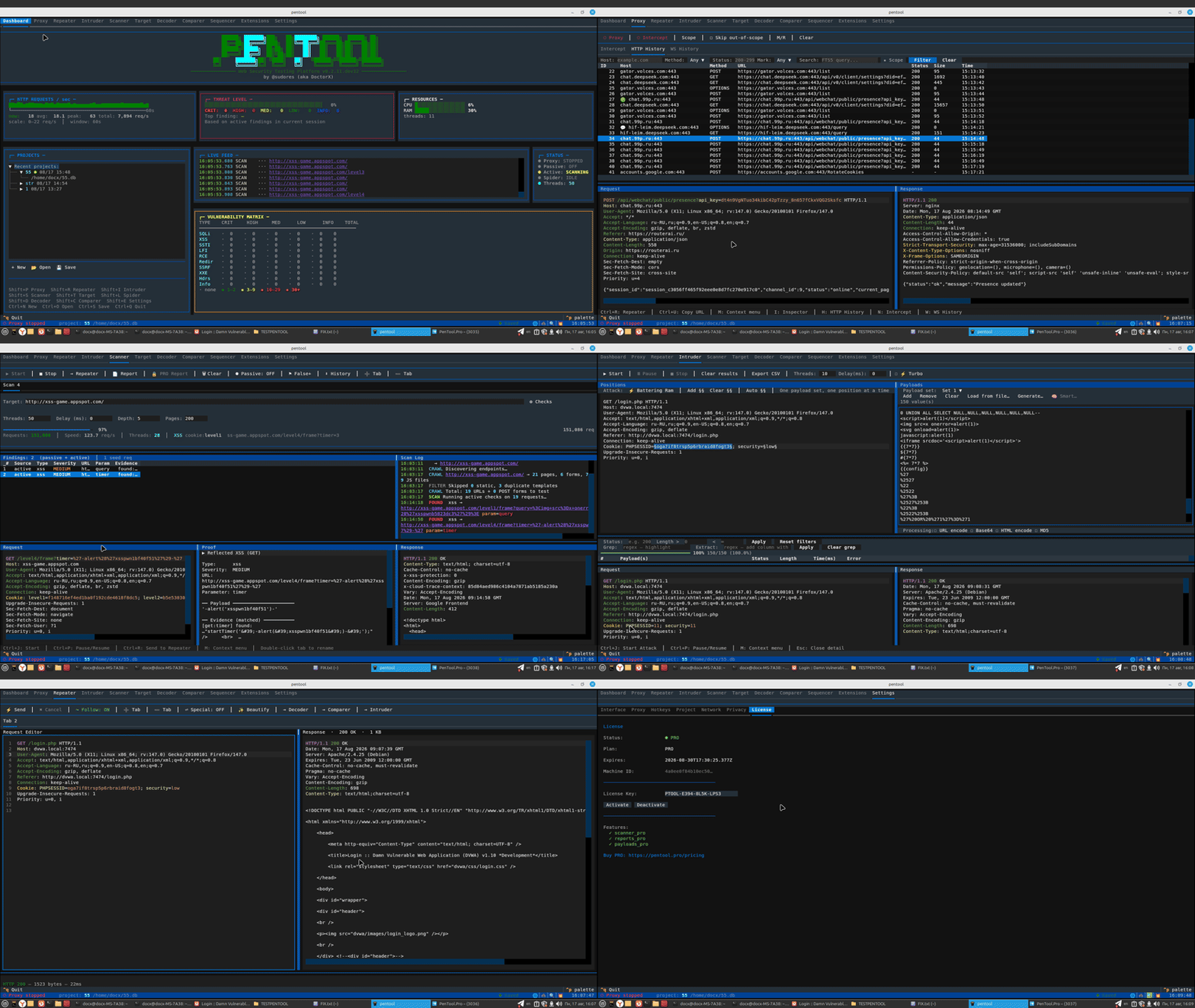
-
🌐 Proxy
Intercept and modify HTTP/HTTPS traffic in real time. Manage scope, apply Match & Replace rules, capture WebSocket messages. -
🔄 Repeater
Replay requests with any modifications. Save tabs between sessions and switch between scenarios instantly. -
💥 Intruder
Run automated payload attacks with four strategies: Sniper, Battering Ram, Pitchfork, Cluster Bomb.
Turbo Mode (PRO) delivers 10× speed via Keep-Alive and connection pooling. -
🔍 Scanner
Active and passive vulnerability analysis: SQLi, XSS, SSTI, LFI, RCE, SSRF, XXE, CORS, JWT flaws, and more.
Smart context-aware payloads, WAF bypass, time-based and boolean-blind techniques. -
🕷 Spider
Crawl targets automatically — collect pages, forms, API endpoints, and JS files.
JavaScript rendering via Playwright is supported. -
🎯 Target / Site Map
Build a site map from proxy traffic, manage testing scope, and filter hosts directly from the UI. -
🔐 Decoder · Comparer · Sequencer
- Decoder — 19 encode/decode/hash operations with chaining support
- Comparer — side-by-side diff with change highlighting
- Sequencer — entropy analysis of tokens (sessions, CSRF, JWT) with FIPS tests
-
🧩 Plugin System
Extend functionality without touching the core. PRO plugins add advanced scanners, smart payloads, and report generators. -
⚡ Async Core
Fully async engine handles thousands of concurrent connections and hundreds of requests per second. -
📦 One-line Install
uv tool install pentool— no complex setup, works on Linux, macOS, and Windows (WSL). -
🆓 Open Source + PRO Extensions
The base version is free and open. PRO extensions unlock exclusive features and support the project.
# Install (recommended — isolated, single command)
uv tool install pentool

# Launch the TUI with a new project for the target (host pre-seeded)
pentool --url https://example.com

# Same, but actually load the target in a headless browser THROUGH the proxy,
# so real traffic lands in HTTP History + Target (needs Playwright/Chromium)
# install:  uv tool run --with playwright python -m playwright install chromium
pentool --url https://example.com --real

# Headless scan — perfect for CI/CD (GitLab CI, GitHub Actions, Jenkins)
pentool --url https://example.com --headless --output result.json

# Start proxy on custom port
pentool proxy start --port 8080

# Active scan (CLI)
pentool scan active --url https://example.com

# Check for updates
pentool update --checkFor automation, run Pentool without the TUI and get a JSON audit report:
pentool --url https://example.com --headless --output result.json- Emits findings as machine-readable JSON for later audit / dashboards.
- Works in GitLab CI, GitHub Actions, Jenkins, cron jobs, or any script.
- No display, no terminal, no interaction required.
Full examples and a ready-to-copy GitHub Actions / GitLab CI template — see the CI/CD Guide.
- 🚀 First Run: Certificate & First Intercept — start here
- Quick Start Guide
- User Guide
- CI/CD Guide (headless)
- Installation
- Plugin Development
- Plugin API Reference
Full docs: pentool.pro
Pentool is currently in public beta.
All free modules are fully functional. PRO features are actively being built — a 14-day trial is available so you can evaluate everything upfront.
Running a security blog, YouTube channel, or Telegram channel?
Write an honest review and recommend Pentool to your audience — we'll give you a permanent PRO license, completely free.
No minimum follower count. We value quality over reach.
→ Reach out: @sudores on Telegram
Pentool is built and maintained by a solo developer in spare time.
If it saves you hours on a pentest — consider giving back. Every contribution directly funds new features, fixes, and faster releases.
- ⭐ Star on GitHub — free, takes 2 seconds, helps visibility enormously
- 💸 Sponsor the project — $5 (individual) or $50 (company, includes logo placement)
- 🔑 PRO license — $29 beta price — early access + lifetime loyalty discount
- 💬 Share — tell a colleague, post a review, or mention Pentool in your writeups
Building tools is lonely work. A star or a kind word genuinely matters. Thank you. 🙏
Contributions are welcome!
Please read CONTRIBUTING.md before opening a PR.
Special thanks to:
- codeby.net — For community support and feedback
Distributed under the AGPL-3.0 license. See LICENSE for details.
PRO extensions are available under a commercial license.
- Website: pentool.pro
- Telegram channel: t.me/pentool_pro
- Telegram: @sudores
- Email: support@pentool.pro
- Author: Anatoly Kashtanov (DoctorX)
⭐ If Pentool saves you time, a GitHub star helps the project grow — thanks!