A responsible, open-source Instagram username availability scanner.




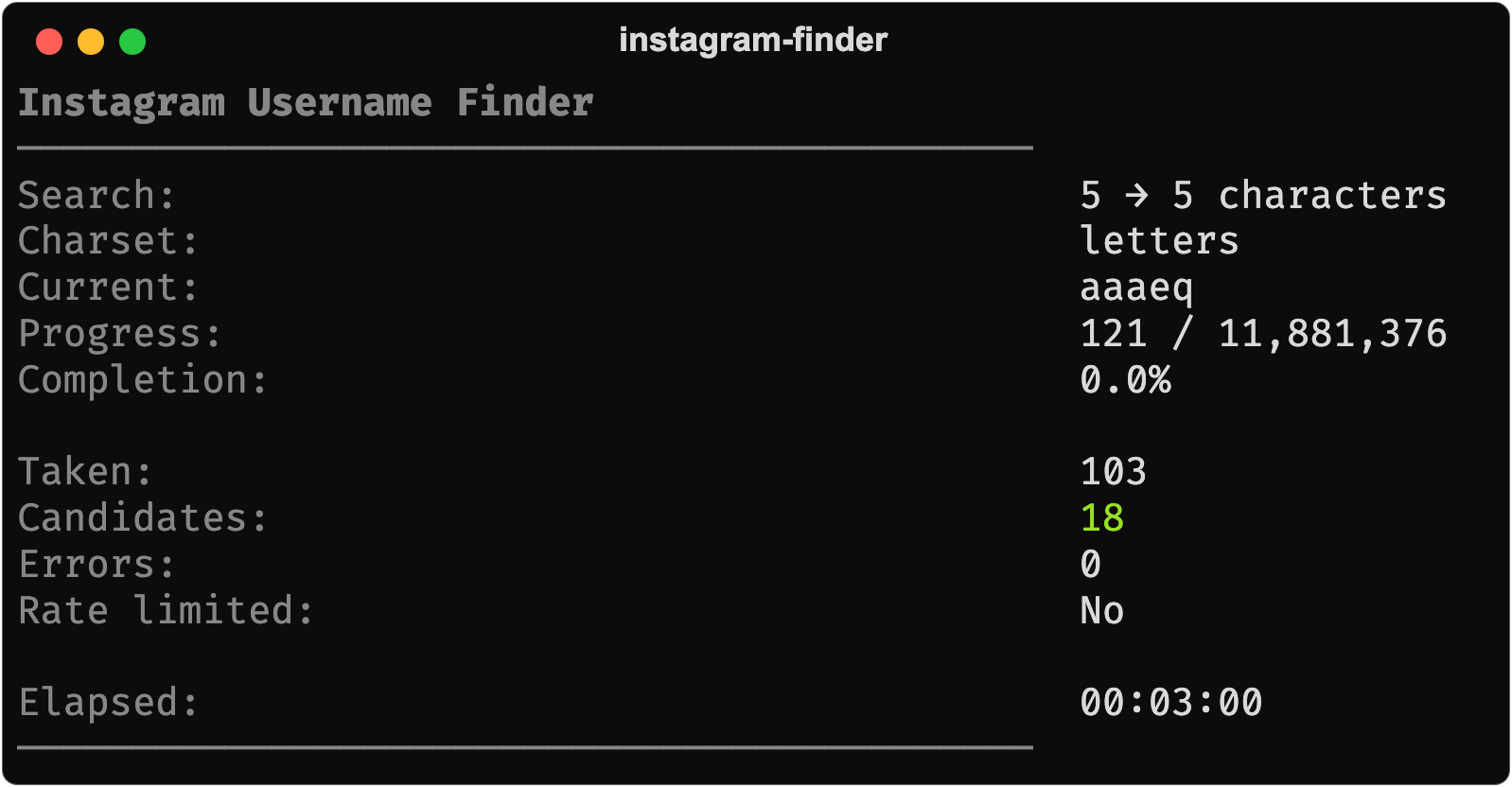
A real run: 121 usernames checked in three minutes, 103 taken, 18 with no profile behind them.
instagram-username-finder searches for short Instagram usernames that have no
publicly accessible profile. It generates candidates lazily, checks them over
bounded async HTTP, backs off the moment it is throttled, and checkpoints its
progress so an interrupted scan resumes exactly where it stopped.
What it reports is deliberately narrow:
Public profile check
        ↓
POSSIBLY_AVAILABLE
        ↓
Manual verification
        ↓
Actual Instagram registration availability
Instagram itself is the final authority. A username with no public profile may still be reserved, restricted, held, or otherwise unregistrable. The tool never claims otherwise — see Limitations.
- Lazy candidate generation — the search space is never materialised, so
--max-length 8costs the same memory as--max-length 3. - Shortest-first search — length 3 is exhausted before length 4 begins.
- Bounded async concurrency — an async queue with a fixed worker pool and a
single pooled
aiohttpsession. - Responsible pacing — configurable delay,
Retry-Aftersupport, exponential backoff with jitter, and a circuit breaker that stops the scan rather than pushing through a rate limit. - Resumable — atomic state checkpoints after every batch;
Ctrl+Ccosts you at most one batch. - Conservative classification — ambiguous responses become
UNKNOWN, never an availability claim. - Multiple outputs — a live terminal dashboard plus
txt,jsonandcsvexport, kept strictly separate. - Layered configuration — CLI flags, environment variables, TOML file, defaults.
- Runs anywhere — local CLI, Docker, or a bounded GitHub Actions run.
Instagram Username Finder
────────────────────────────────────────────

Search:       3 → 4 characters
Charset:      letters
Current:      qzx
Progress:     8,420 / 17,576
Completion:   47.9%

Taken:        8,411
Candidates:   9
Errors:       0
Rate limited: No

Elapsed:      00:08:42
────────────────────────────────────────────
When the scan ends:
Scan finished: found
  Checked:            8,420
  Taken:              8,411
  Possibly available: 9
  Errors:             0
  Elapsed:            00:08:42

POSSIBLY_AVAILABLE candidates:
  qzx  (HTTP 404)

POSSIBLY_AVAILABLE means no publicly accessible profile was observed. It is not
a guarantee that the username can be registered.
Requires Python 3.11+.
git clone https://github.com/FadeHack/instagram-username-finder.git
cd instagram-username-finder

python -m venv .venv
source .venv/bin/activate      # Windows: .venv\Scripts\activate

pip install -e .
Or with make:
make installinstagram-finder scan \
--min-length 3 \
--max-length 4 \
--charset lettersThat scans every three-letter username, then every four-letter username, and stops at the first candidate it finds.
# Explore the CLI
instagram-finder --help
instagram-finder --version
instagram-finder scan --help

# Digits only, collect every candidate instead of stopping at the first
instagram-finder scan --min-length 4 --max-length 4 --charset digits --collect-all

# A specific alphabet
instagram-finder scan --min-length 3 --max-length 3 --characters abc123

# Gentler on the network than the defaults
instagram-finder scan --concurrency 2 --delay 1.5 --timeout 15 --max-retries 5

# Bounded run, CSV to a file
instagram-finder scan --max-checks 5000 --output data/results.csv --format csv

# Pipe JSON straight into jq (progress goes to stderr, data to stdout)
instagram-finder scan --max-checks 200 --output - --format json | jq '.summary'

# Stop and resume
instagram-finder scan --min-length 4 --max-length 4      # Ctrl+C at any point
instagram-finder scan --min-length 4 --max-length 4 --resume

# Start over, discarding saved state
instagram-finder scan --min-length 4 --max-length 4 --fresh| Flag | Default | Meaning |
|---|---|---|
--min-length |
3 |
Shortest username length to search |
--max-length |
4 |
Longest username length to search |
--charset |
letters |
letters, digits, letters_digits, instagram, custom |
--characters |
– | Explicit alphabet, e.g. abc123 (implies custom) |
--concurrency |
5 |
Simultaneous in-flight requests |
--batch-size |
100 |
Candidates per checkpoint |
--delay |
0.5 |
Minimum seconds between request starts |
--timeout |
10 |
Per-request timeout, seconds |
--max-retries |
3 |
Retries for timeouts, connection errors and 5xx |
--max-checks |
– | Stop after this many checks |
--time-limit |
– | Stop after this many seconds |
--output |
– | Result file, or - for stdout |
--format |
json |
txt, json, csv |
--state-file |
data/state.json |
Where resume state is stored |
--config |
– | TOML configuration file |
--resume |
– | Require existing state and continue from it |
--fresh |
– | Discard existing state and start over |
--stop-on-first |
on | Stop at the first candidate |
--collect-all |
– | Scan the whole space, collecting every candidate |
--verbose / --quiet |
– | Debug logging / errors only |
--no-progress |
– | Disable the live dashboard |
| Code | Meaning |
|---|---|
0 |
Scan completed, or stopped cleanly at a limit |
1 |
Unexpected error |
2 |
Invalid usage or configuration |
4 |
Stopped by the circuit breaker after persistent rate limiting (progress saved) |
130 |
Interrupted with SIGINT/SIGTERM (progress saved) |
Lengths run shortest-first, and within a length candidates run in lexicographic order over the sorted alphabet:
3 characters (aaa → zzz)
     ↓
4 characters (aaaa → zzzz)
By default (--stop-on-first) the scan stops as soon as a length yields a
candidate, on the assumption that a shorter username is what you were after.
--collect-all searches the entire configured space and reports everything it
finds.
Settings resolve in this order, highest priority first:
CLI flag → environment variable → TOML config file → built-in default
Environment variables use the USERNAME_FINDER_ prefix:
export USERNAME_FINDER_CONCURRENCY=3
export USERNAME_FINDER_DELAY=1.0
instagram-finder scan
A config file keeps long invocations readable:
# config.toml
min_length = 3
max_length = 4
charset = "letters"

concurrency = 5
batch_size = 100

delay = 0.5
timeout = 10
max_retries = 3

output = "data/results.json"
state_file = "data/state.json"

stop_on_first = true
instagram-finder scan --config config.tomlSee examples/config.example.toml and
docs/configuration.md for every key.
State is written atomically after every batch, so a scan survives Ctrl+C,
SIGTERM, a rate-limit stop, or a crash:
{
  "version": 1,
  "search_length": 3,
  "current_index": 8420,
  "checked": 8420,
  "found": [],
  "updated_at": "2026-01-15T09:30:00+00:00"
}- State is picked up automatically when it matches the current search space.
--resumemakes resuming mandatory: no state file is an error.--freshdiscards it and starts over.- Changing the alphabet or length range invalidates the state — indices mean nothing against a different space — and the tool refuses rather than producing a silently wrong scan.
JSON (--format json):
{
  "username": "qzx",
  "status": "possibly_available",
  "http_status": 404,
  "latency_ms": 184
}
CSV (--format csv):
username,status,http_status,latency_ms,error
qzx,possibly_available,404,184,
abc,taken,200,210,
TXT (--format txt) — one candidate per line, with a commented header.
Progress output goes to stderr, machine-readable output to the file you name
(or stdout with --output -), so pretty output never contaminates your data.
Statuses: taken, possibly_available, rate_limited, timeout,
network_error, unknown.
docker build -t instagram-username-finder .

docker run --rm \
  instagram-username-finder \
  scan \
  --min-length 3 \
  --max-length 4 \
  --charset letters
Mount ./data to keep results and resume state across runs:
docker run --rm -v "$PWD/data:/app/data" \
  instagram-username-finder \
  scan --min-length 3 --max-length 4 --charset letters \
       --state-file data/state.json --output data/results.json
Published images (version tags only):
docker pull ghcr.io/FadeHack/instagram-username-finder:latestThe image runs as a non-root user, contains no build tools and no secrets. Full details in docs/docker.md.
| Workflow | Trigger | Purpose |
|---|---|---|
ci.yml |
push, PR | Ruff, MyPy, pytest on 3.11–3.13, package build |
docker.yml |
push, PR (image paths) | Build the image, verify --version/--help, non-root check, Trivy scan |
scheduled-scan.yml |
manual, daily cron | A bounded scan that saves state and uploads artifacts |
release.yml |
v*.*.* tags |
Test, build, publish to GHCR, create the release |
Scheduled scanning is off by default. Set the repository variable
ENABLE_SCHEDULED_SCAN to true to turn it on; delete it to turn it off again.
workflow_dispatch always works for manual, on-demand runs.
Each execution is strictly bounded — it restores state, does a limited amount of
work (--max-checks / --time-limit), saves results and state, uploads
artifacts, and exits. Nothing runs indefinitely.
State persists through the GitHub Actions cache: no repository commits, no external storage, no extra credentials. The trade-off (caches are evicted after 7 idle days) and the alternatives are discussed in docs/github-actions.md.
CLI
 │
 ▼
Configuration
 │
 ▼
Scanner
 │
 ├── Username Generator
 ├── Rate Limiter
 ├── Username Checker ── Retry Manager
 ├── Persistence
 └── Output
Each component has one job. The scanner does no terminal formatting, the HTTP checker does no persistence, the generator makes no requests. Work flows through a bounded pipeline:
Generator → Batch → Bounded queue → N workers → Results → Checkpoint
See docs/architecture.md for the full walkthrough.
Results reported as
POSSIBLY_AVAILABLEare not guaranteed to be claimable. Instagram may reserve or restrict usernames even when no publicly accessible profile exists. Always verify a candidate directly through Instagram.
Concretely:
- HTTP status alone is insufficient. Instagram answers HTTP 200 for both real and non-existent profiles, so classification depends on inspecting the page, not the status code. And even a confirmed absence does not mean the name is registrable: deleted, deactivated, suspended, reserved and trademark-held usernames all look identical from the outside.
- Rate limits interrupt scans. Instagram throttles unauthenticated traffic. The tool backs off, saves progress and stops; it does not push through.
- Network errors create uncertainty. Timeouts and connection failures are
reported as
timeout/network_errorand are never counted as available. - Login walls are ambiguous. A response that looks like a login interstitial
is classified
unknown, because it describes our session, not the username. - Classification depends on page markup. The classifier keys on Open Graph
metadata that Instagram emits only for real profiles. Instagram changes its
HTML, so this may need updating; when it does, unrecognised pages report
unknownrather than silently becoming false candidates. Please file a false availability report if you find a mismatch. - The tool intentionally does not bypass platform restrictions, so it is slower than tools that do. That is the design, not an oversight.
This project is built to behave well toward a service it does not own.
It does: pace requests conservatively by default, honour Retry-After, back
off exponentially, stop after persistent throttling, identify itself honestly in
its User-Agent, and read only publicly accessible pages.
It does not, and will not, implement:
- proxy or IP rotation intended to bypass rate limits
- CAPTCHA or authentication bypass
- cookie, session or account rotation to evade restrictions
- browser fingerprint spoofing
- automated account creation
- any other mechanism intended to circumvent platform restrictions
Feature requests along those lines will be declined.
Before you scan, please also:
- Review Instagram's Terms of Use and confirm your use is permitted.
- Keep concurrency low and delay high. The defaults are already conservative; raising them mostly earns you a rate limit.
- Prefer bounded runs (
--max-checks,--time-limit) over open-ended ones. - Treat
POSSIBLY_AVAILABLEas a lead to verify, not a result. - Don't use this to harvest, squat on, or resell usernames.
You are responsible for how you use this software.
Contributions are welcome. See CONTRIBUTING.md for the workflow and coding standards, and CODE_OF_CONDUCT.md for community expectations.
pip install -e ".[dev]"

make check          # lint + typecheck + tests
make test
make lint
make typecheck
make format
make docker-buildpytest # everything
pytest tests/unit # unit tests only
pytest -m integration # end-to-end scans against fake transports
pytest --cov # with coverageNo test touches Instagram. HTTP behaviour is exercised against a throwaway aiohttp server on localhost, and scans run against in-memory fake checkers.
Please report vulnerabilities privately — see SECURITY.md. Never include credentials, cookies, session IDs or access tokens in an issue.
MIT.
This project is not affiliated with, endorsed by, or connected to Instagram or Meta Platforms, Inc.