


RTL Agents brings proper Right-to-Left rendering to the AI chat panels of Antigravity, Cursor, VS Code, Windsurf, and VSCodium — without flipping your editor, your code, or your tables.
Direction is resolved by the browser itself, per paragraph, from the first strong directional character. A Persian paragraph aligns right, an English one stays left, and both can live in the same reply. Because it is pure CSS applied at layout time, streamed text never renders left-aligned and then jumps.
Optimized for Persian, Arabic, and Hebrew.
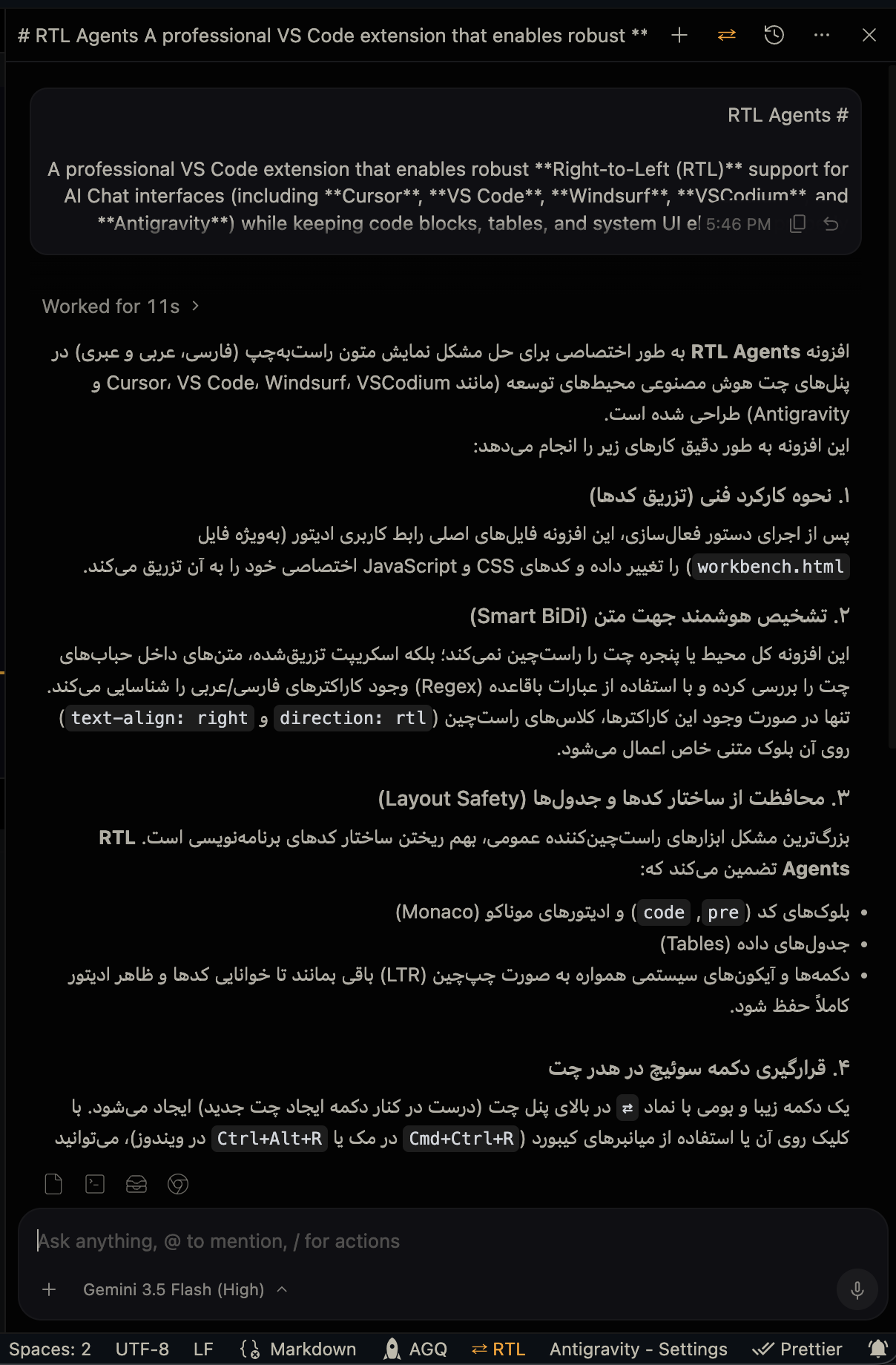
Persian AI responses aligned right, with code blocks and UI left intact
- 🌐 Multi-IDE Support: Detects the running editor and patches every workbench document it owns — including Antigravity's separate agent window.
- ⚡ Native Bidirectional Alignment: Uses
unicode-bidi: plaintext, so the browser resolves direction per paragraph. No character regex to maintain, no guessing. - ✨ Zero Flicker While Streaming: Alignment lands before the first paint. There is no per-word JavaScript, no document-wide
MutationObserver, and no measurable CPU cost while a reply generates. - 🛡️ Code & Layout Safety:
pre,code, Monaco editors, and table column order stay LTR — including a code snippet sitting inside a Persian sentence. - ⇄ Native Toggle Button: Injects a
⇄button into the chat header next to "New Chat", borrowing its styling. The header button and the status bar item always agree. - 💾 Persistent & Synced: Remembers your preference across reloads and keeps every patched window in step instantly.
- 🔑 Checksum Bypass: Strips the relevant
product.jsonchecksums to avoid the[Unsupported]warning, and restores them exactly on deactivation. - ♻️ Clean Uninstall: Deactivating removes the button immediately and restores every file byte for byte. A backup from an older IDE build is never written over a newer one.
- 🔄 Auto-Reactivation: Detects editor updates and re-applies the patch.
Install from the VS Code Marketplace or Open VSX, or grab the .vsix from Releases:
# VS Code
code --install-extension rtl-agents-<version>.vsix --force

# Cursor
cursor --install-extension rtl-agents-<version>.vsix --force

# Antigravity
antigravity --install-extension rtl-agents-<version>.vsix --forceBecause the extension modifies workbench files on disk to reach the chat panel, it needs a one-time activation.
- Open the Command Palette —
Ctrl+Shift+P(Windows/Linux) orCmd+Shift+P(macOS). - Run
RTL Agents: Activate RTL. - Fully quit and reopen your IDE. A "Reload Window" is not enough.
- Open the AI chat and press
Ctrl+Alt+R/Cmd+Ctrl+R, or click the⇄button.
Tip
Permission denied on macOS or Linux?
Editor files on disk are write-protected, so this is expected. The command outputs a copyable sudo chown ... fix — run it in your terminal, then activate again.
{
  "rtl-agents.customSelectors": [
    ".my-custom-chat-panel",
    "div[class*=\"custom-message-list\"]"
  ]
}rtl-agents.customSelectors— Additional chat container selectors. Text inside them resolves direction per paragraph, exactly like the built-in containers. Editing this rewrites the injected stylesheet right away; no re-patch needed.
Note
rtl-agents.rtlCharacterRegex is deprecated as of v2.0.0 and ignored. Direction is now resolved natively by the browser, so there is no character list to configure.
| Command | Shortcut | Description |
|---|---|---|
RTL Agents: Activate RTL |
— | Injects the CSS/JS and strips workbench checksums. |
RTL Agents: Toggle RTL/LTR |
Ctrl+Alt+R / Cmd+Ctrl+R |
Switches direction instantly. |
RTL Agents: Deactivate RTL |
— | Restores every patched file to its original state. |
RTL Agents: Check Status |
— | Reports which workbench documents are patched. |
RTL Agents: Restart RTL |
— | Restores originals, then re-applies the patch. |
pnpm install
pnpm build   # bundle the extension
pnpm test    # patch/unpatch round trip and asset generation
pnpm lint
pnpm test exercises the patch layer against synthetic fixtures in a temp directory — it never touches a real IDE installation.
MIT © Foshati