You signed in with another tab or window. Reload to refresh your session.You signed out in another tab or window. Reload to refresh your session.You switched accounts on another tab or window. Reload to refresh your session.Dismiss alert
In MSYS2_Commander install-dev-env and install-qt5-env commands are done.
Part 1: Preparing for work
Run QtCreator.
Clone repository, add maze sources, create and open project for maze sources, compile and run.
Install mingw-w64-x86_64-pdcurses library.
Link pdcurses library, link aditional libraries for practice (libs\libmazify.a, libs\libcurses-helper-utils).
Draw map using pdcurses lib.
Forming teams, assigning tasks.
Part2: Tasks
Add random maze walls generation
clone git repo
create branch random-walls-generation using command git checkout -b random-walls-generation
use ready part from homework or use void mazify(std::array<std::array<char, mazeColumns>, mazeRows> &maze, int x1, int x2, int y1, int y2); where maze is reference to game field where walls should be generated, x1 and x2 minimum and maximum row, y1 and y2 minimum and maximum column used to place maze walls in between.
include mazify.h header to use mazify() function, if needed
place call to function that generate random walls in appropriate place
commit your changes to git
push your branch to remote using git push -u origin random-walls-generation
Add key to gameplay
clone git repo
create branch key-to-exit using command git checkout -b key-to-exit
add call to placeCharRandomly() function from random-utils.h to place a key on a map
create variable that indicate that key was found by player
make exit end the game only if key was found, otherwise exit should behave like a wall
commit your changes to git
push your branch to remote using git push -u origin key-to-exit
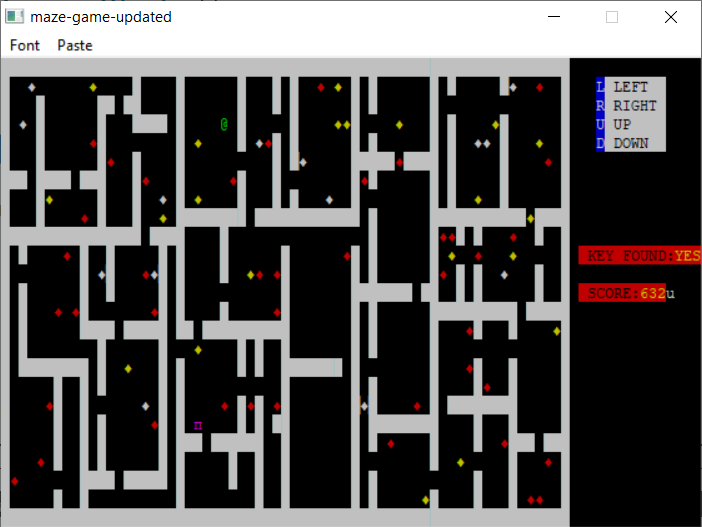
Use different symbol for each game element
clone git repo
create branch map-decoration using command git checkout -b map-decoration
Define new colorful symbol by printing symbol | COLOR_PAIR(color) for each value on the game map, for example ACS_DIAMOND | COLOR_PAIR(7). Use following table (where symbol should not be changed - is placed)
value
symbol
color
empty
-
1
wall
ACS_BLOCK
8
character
-
3
exit
ACS_PI
6
key
-
4
score1
ACS_DIAMOND
5
score2
ACS_DIAMOND
7
score3
ACS_DIAMOND
8
commit your changes to git
push your branch to remote using git push -u origin map-decoration
Add scores for character moves
clone git repo
create branch game-scores using command git checkout -b game-scores
create variable that will store scores
add call to placeCharRandomly() function from random-utils.h to place scores on a map. Count of score items: score1 - 25 items on a map, score2 - 10 items on a map, score3 - 3 items on a map
decrease scores value by 1, on each character move
increase scores value when character takes score item: score1 +10, score2 +25, score3 +50
commit your changes to git
push your branch to remote using git push -u origin game-scores
Draw info how to move character
clone git repo
create branch game-info using command git checkout -b game-info
create a function that prints scores value and status for key, use function printStringToTerminalWindow() from curses-helper-utils.h, use color as a third parameter COLOR_PAIR(33) for label, COLOR_PAIR(39) for value
to convert scores from integer to string, use std::to_string() function that takes integer as a parameter and returns string
display YES or NO for key status
commit your changes to git
push your branch to remote using git push -u origin game-info
Create function that prints information about controls and message, when user wins
clone git repo
create branch game-messages using command git checkout -b game-messages
create a function that prints information about controls, use function printStringToTerminalWindow() from curses-helper-utils.h, use color as a third parameter COLOR_PAIR(57) for key, COLOR_PAIR(16) for description
use following information: L LEFT, R RIGHT, U UP, D DOWN
print message CONGRATULATIONS! YOU WIN! in the center of the screen, after user wins the game, use COLOR_PAIR(39) for color. Message should be displayed and game should not exit until user press a key.
commit your changes to git
push your branch to remote using git push -u origin game-messages
Part 3: Put all together
Discussing each implementation, merging changes
Discussion of workshop, what goes well and what is not
About
The repository contains boilerplate and instructions for MazeGame practice.