Visit the node-cmd GitHub.io site
API reference · Testing & coverage · Benchmarks · Security · Migration · Changelog









Command-line power for Node.js. Run shell commands, launch executables, stream output, write to stdin, and control child processes. node-cmd has zero runtime dependencies and supports both Node.js CommonJS and native Node.js ES modules.
The original run() and runSync() APIs remain available. Version 6 adds forwarded execution options, Promise APIs, direct executable APIs that avoid a shell by default, an unbuffered spawn wrapper, and explicit cancellation support.
node-cmd is Node.js-only. It does not run in browsers, with or without a bundler. Its public API requires Node's built-in node:child_process module and operating-system process access. “Native ESM” in this project means native Node.js ESM.
No browser entry, browser shim, import map, playground, or native-Chrome suite is provided because browsers cannot expose child-process control. A Node-targeted bundler may externalize Node built-ins, but a browser-targeted bundle cannot grant browser JavaScript operating-system process privileges. Native-browser conformance and runtime-dependency conflict testing are not applicable; the package has zero runtime dependencies.
Node already provides node:child_process; node-cmd turns its common execution paths into one small, consistent API. Use shell syntax when you need it, keep executable arguments separate when you do not, and choose callback, Promise, synchronous, buffered, or streaming control without a production dependency tree.
run*handles intentional shell commands;runFile*andrunStream()are direct by default.- Existing
run()andrunSync()calls remain valid while modern options, cancellation, and immediateChildProcessaccess stay available. - CommonJS and ESM load the same implementation on Node.js 22.12+, so runtime behavior is not duplicated between module systems.
npm install node-cmdnode-cmd 6 requires Node.js 22.12 or newer.
const cmd = require('node-cmd');

cmd.run('node --version', (error, data, stderr) => {
    if (error) {
        console.error(stderr || error.message);
        return;
    }

    console.log(data);
});import { runPromise } from 'node-cmd';
const { stdout, stderr } = await runPromise('node --version');
if (stderr) {
console.error(stderr);
}
console.log(stdout);import { runFilePromise } from 'node-cmd';
const { stdout } = await runFilePromise(
process.execPath,
['--version']
);
console.log(stdout);runFile*() keeps the executable and its arguments separate and does not start a shell by default. Prefer it when any argument may contain untrusted or variable data.
node-cmd delegates to the matching Node child-process primitive. A dependency-free harness measures JavaScript dispatch separately from real process completion so the wrapper’s cost is visible instead of being lost inside operating-system launch time.
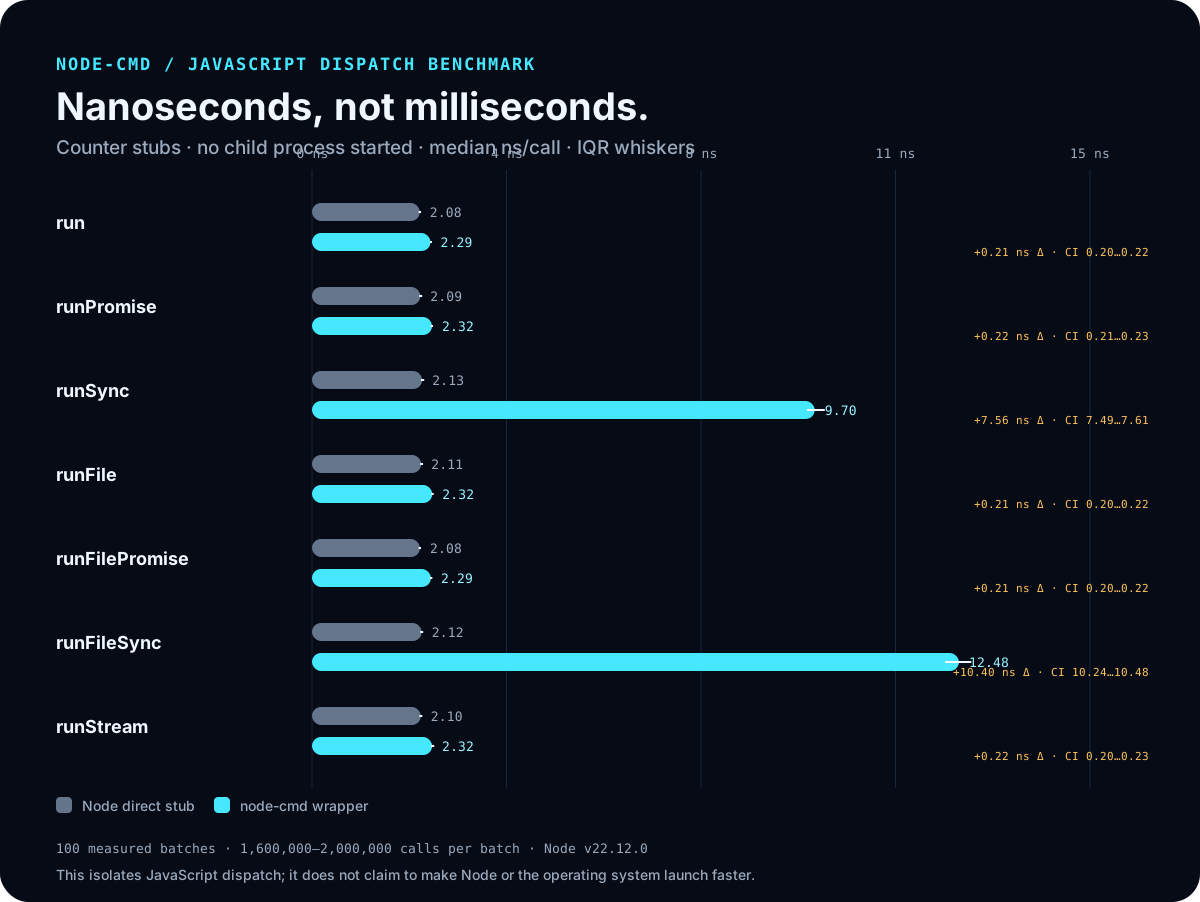
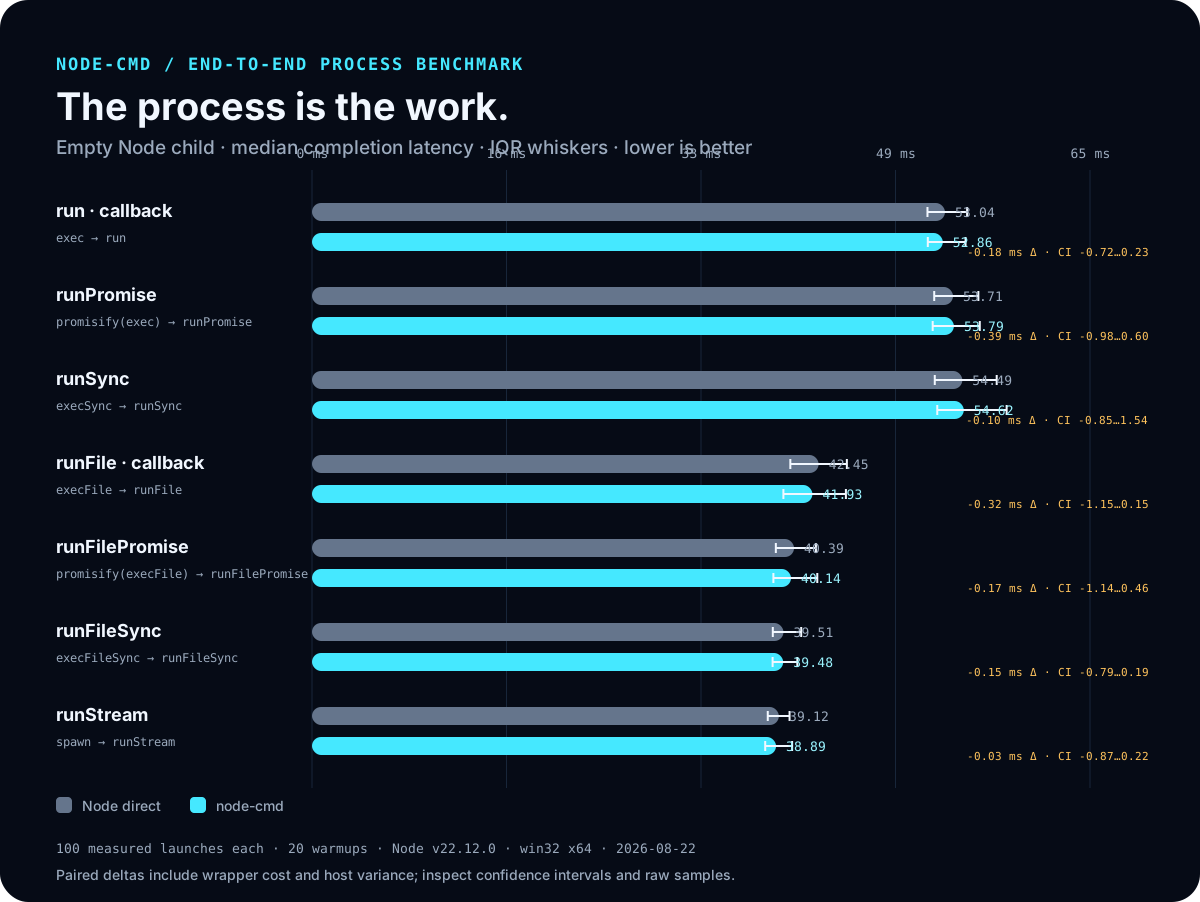
On the Node.js 22.12.0 reference run, common callback, Promise, direct-file, and streaming paths added median dispatch costs of 0.21–0.22 ns; synchronous result normalization added 7.56–10.40 ns. Empty-process completion took about 39–55 ms. All seven paired completion-time comparisons included zero in their 95% confidence intervals, so this run did not resolve a completion-time difference.
The largest measured dispatch delta was roughly 3.8 million times smaller than its matching child-process duration. Confidence intervals that include zero do not prove mathematical equivalence, and absolute launch time varies by machine and operating system. Read the methodology and exact tables, download the raw samples, or inspect the benchmark source. These results support negligible wrapper cost; they do not claim that node-cmd makes Node or the operating system launch a process faster.
| Method | Signature | Returns |
|---|---|---|
run |
run(command, options?, callback?) |
ChildProcess |
runSync |
runSync(command, options?) |
{ err, data, stderr } |
runPromise |
runPromise(command, options?) |
Promise<{ stdout, stderr }> |
runPromisified |
Alias of runPromise |
Promise<{ stdout, stderr }> |
runFile |
runFile(file, args?, options?, callback?) |
ChildProcess |
runFileSync |
runFileSync(file, args?, options?) |
{ err, data, stderr } |
runFilePromise |
runFilePromise(file, args?, options?) |
Promise<{ stdout, stderr }> |
runFilePromisified |
Alias of runFilePromise |
Promise<{ stdout, stderr }> |
runStream |
runStream(file, args?, options?) |
ChildProcess |
The default export and CommonJS export expose the same methods. Native Node.js ESM also provides named exports.
Runs a command through the platform shell. The callback keeps the established Node-style shape:
cmd.run(
    'node --version',
    { cwd: process.cwd(), timeout: 10_000 },
    (error, data, stderr) => {
        if (error) {
            console.error(error);
            return;
        }

        console.log(data);
    }
);
The options object is optional, so existing run(command, callback) calls continue to work. The returned ChildProcess is available whether or not a callback is supplied.
Runs a shell command and resolves with its buffered output:
const { stdout, stderr } = await cmd.runPromise('node --version', {
    timeout: 10_000
});
It rejects when the command cannot start, exits unsuccessfully, times out, is aborted, or exceeds maxBuffer. Rejection errors retain Node's child-process details, including stdout and stderr when Node provides them.
The returned Promise also exposes its immediate ChildProcess as .child when PID, events, or cancellation are needed before the buffered result settles:
const pending = cmd.runPromise('node --version');
console.log(pending.child.pid);
const result = await pending;
runPromisified is an exact compatibility alias of runPromise.
Runs a shell command synchronously and preserves the established result keys:
const result = cmd.runSync('node --version');

if (result.err) {
    console.error(result.stderr || result.err);
} else {
    console.log(result.data);
}datacontains standard output on success and isnullon ordinary command failure.errisnullon success and describes an ordinary command failure.stderrcontains captured standard error when available.
Use synchronous execution only when blocking the Node.js event loop is acceptable.
The runFile*() methods execute a file with an argument array and buffer its output. Their callback, Promise, and synchronous result shapes match the corresponding shell-command methods.
cmd.runFile(
    process.execPath,
    ['--version'],
    { timeout: 10_000 },
    (error, data, stderr) => {
        if (error) {
            console.error(stderr || error.message);
            return;
        }

        console.log(data);
    }
);
runFilePromisified is an exact compatibility alias of runFilePromise.
The Promise returned by runFilePromise() or its alias likewise exposes the direct child as .child.
Wraps Node's spawn() for long-running, high-output, or interactive programs. It does not buffer complete stdout or stderr and returns the ChildProcess immediately.
import { runStream } from 'node-cmd';

const child = runStream(process.execPath, ['--version']);

child.stdout.setEncoding('utf8');
child.stdout.on('data', (chunk) => process.stdout.write(chunk));
child.stderr.on('data', (chunk) => process.stderr.write(chunk));
child.on('close', (code, signal) => {
    console.log({ code, signal });
});
Arguments remain separate and no shell is used by default. Set options.shell only when shell parsing is intentional; doing so reintroduces platform-specific quoting and injection risks.
Execution options are forwarded to Node's child_process APIs. Common options include:
| Option | Purpose |
|---|---|
cwd |
Working directory for the child process |
env |
Environment variables supplied to the child process |
encoding |
Buffered-output encoding; use 'buffer' or null for buffers |
timeout |
Milliseconds before Node requests child termination |
signal |
AbortSignal for asynchronous cancellation |
shell |
Shell executable or shell enablement where supported |
maxBuffer |
Maximum buffered stdout or stderr before termination |
killSignal |
Signal used for timeout or cancellation |
windowsHide |
Hide the subprocess window on Windows |
Not every Node option applies to every method. Synchronous calls cannot be cancelled with an AbortSignal, and runStream() is unbuffered so encoding and maxBuffer do not apply to it. Set an encoding directly on its stdout or stderr stream when text is wanted.
Setting shell: true on a direct-file or streaming call reintroduces shell parsing and its injection risks.
run(), runFile(), and runStream() return Node's ChildProcess. Use it for streaming output, interactive input, PID inspection, events, and manual termination. Prefer runStream() when output can be large or the process is expected to stay open.
const child = cmd.runStream(process.execPath, ['--version']);

console.log(child.pid);
child.stdout.setEncoding('utf8');
child.stdout.on('data', (chunk) => process.stdout.write(chunk));
child.stderr.on('data', (chunk) => process.stderr.write(chunk));const child = cmd.runStream(process.execPath, ['--interactive']);
child.stdout.setEncoding('utf8');
child.stdout.on('data', (chunk) => process.stdout.write(chunk));
child.stdin.write('console.log(6 * 7)\n');
child.stdin.write('.exit\n');
child.stdin.end();Write to the returned child's stdin; callback output values are completed buffers, not process handles.
const controller = new AbortController();

cmd.run(
    'long-running-command',
    { signal: controller.signal },
    (error) => {
        if (error?.name === 'AbortError') {
            console.log('Command cancelled');
        }
    }
);

controller.abort();
You can also retain the returned child and call child.kill(). A shell command may create descendant processes; terminating the shell does not guarantee that every descendant is terminated on every operating system.
A timeout or kill signal requests termination; it is not a guaranteed hard deadline or a portable process-tree boundary.
run() and runPromise() intentionally execute shell command strings. Never concatenate untrusted input into those strings:
// Unsafe: userValue can change the command interpreted by the shell.
cmd.run(`tool --name ${userValue}`);

// Safer: the value remains one executable argument.
cmd.runFile('tool', ['--name', userValue]);
runFile*() and runStream() reduce shell-injection risk when their default no-shell behavior is preserved, but the called executable can still interpret arguments in unsafe ways. Validate inputs and use the smallest necessary environment and working directory. See SECURITY.md before running commands influenced by another user or service.
Shell syntax is platform-specific. Shell commands normally use /bin/sh on Unix-like systems and ComSpec on Windows, so quoting, environment expansion, separators, and built-in commands differ.
Prefer runFile*() or runStream() for portable executable calls. Windows .bat and .cmd files require a command shell; use run() or opt into a shell deliberately when invoking them.
node-cmd does not request administrator, root, or UAC elevation. Child processes inherit the privileges of the Node.js process that starts them.
The project uses vanilla-test 2.1.0 for both test execution and Node coverage. It is the only direct development dependency; the published node-cmd package keeps zero runtime dependencies.
The JavaScript suite contains 53 focused cases across five independently runnable sets. The Behavioral set composes public APIs into black-box consumer outcomes, while the other sets keep narrower contract ownership.
| Test set | Cases | Focus |
|---|---|---|
| Unit | 5 | CommonJS and ESM surface plus compatibility aliases |
| Functional | 17 | Normal callback, Promise, synchronous, direct-file, and streaming behavior |
| Behavioral | 5 | Shell composition, failure output, buffer limits, timeouts, and live output |
| Integration | 8 | Process I/O, environment, cancellation, stderr isolation, and literal arguments |
| Regression | 18 | Overloads, omitted values, buffers, validation, and error normalization |
| Total | 53 | Public execution paths, compatibility edges, and consumer workflows |
| Gate | Current result | Required |
|---|---|---|
| Full JavaScript suite | 53 / 53 passing | All passing |
| Behavioral set | 5 / 5 passing | All passing |
| Statements | 100% | 100% |
| Branches | 100% | 100% |
| Functions | 100% | 100% |
| Lines | 100% | 100% |
Continuous integration runs the suite on Node.js 22.12 and Node.js 24 across Linux, macOS, and Windows. Coverage runs through vanilla-test coverage node, using native V8 execution without transforming node-cmd source. The generated engineer-readable HTML coverage report and ANSI-free test result artifact are published with the documentation site.
npm ci
npm test
npm run test:unit
npm run test:functional
npm run test:behavioral
npm run test:integration
npm run test:regression
npm run test:runtime-contract
npm run coverage
npm run test:package
npm run benchmark
npm run benchmark:chart
The five test:* commands run one set independently; npm test and npm run coverage always run all 53 cases. Coverage writes the local HTML report to coverage/node/index.html. npm run benchmark prints a local comparison; pass --output <file> to retain its raw samples. npm run benchmark:chart regenerates the committed README charts from the reference JSON. npm run verify runs the full suite, coverage gates, packed-package smoke test, and static-site validation together.
When upgrading from v5, read MIGRATION.md. Release details are in CHANGELOG.md, and command-execution guidance is in SECURITY.md.