


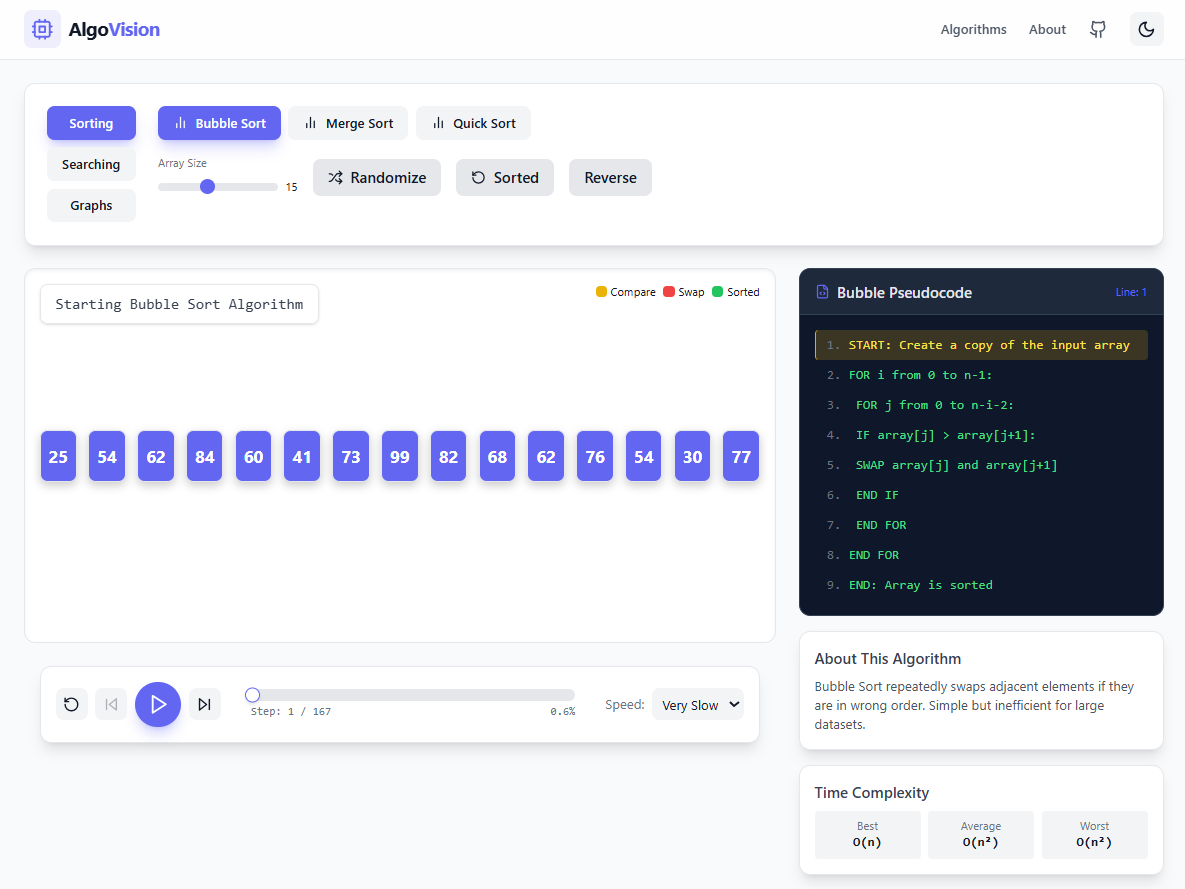
An interactive algorithm visualizer for engineering students to understand algorithms step-by-step through beautiful animations.
| Algorithm | Time Complexity (Average) | Space Complexity |
|---|---|---|
| Bubble Sort | O(n²) | O(1) |
| Merge Sort | O(n log n) | O(n) |
| Quick Sort | O(n log n) | O(log n) |
| Algorithm | Time Complexity | Space Complexity |
|---|---|---|
| Binary Search | O(log n) | O(1) |
| Algorithm | Time Complexity | Space Complexity |
|---|---|---|
| Breadth First Search (BFS) | O(V + E) | O(V) |
| Depth First Search (DFS) | O(V + E) | O(V) |
| Dijkstra's Algorithm | O(E log V) | O(V) |
| Bellman-Ford Algorithm | O(VE) | O(V) |
| Floyd-Warshall Algorithm | O(V³) | O(V²) |
| Prim's Algorithm | O(E log V) | O(V) |
| Kruskal's Algorithm | O(E log E) | O(V) |
- Step-by-step Visualization: Watch algorithms execute one step at a time
- Speed Control: Adjust playback speed from Very Slow to Turbo
- Play/Pause/Resume: Control the visualization playback
- Previous/Next Step: Navigate through algorithm steps manually
- Reset: Start over with fresh data
- Custom Input:
- Sorting: Adjustable array size, random generation, pre-sorted, reverse-sorted
- Binary Search: Custom target value
- Graph: Selectable start/end nodes
- Pseudocode Panel: View algorithm pseudocode with highlighted active lines
- Explanation Text: Real-time descriptions of what's happening at each step
- Dark Mode: Modern UI with dark/light theme toggle
- Node.js (v18 or higher)
- npm or yarn
-
Clone the repository
git clone https://github.com/yourusername/algo-visualizer.git cd algo-visualizer -
Install dependencies
npm install
-
Start the development server
npm run dev
-
Open in browser Navigate to
http://localhost:5173
npm run buildThe build output will be in the dist/ folder.
algo-visualizer/
├── public/
├── src/
│   ├── algorithms/          # Pure algorithm logic
│   │   ├── bubbleSort.js
│   │   ├── mergeSort.js
│   │   ├── quickSort.js
│   │   ├── binarySearch.js
│   │   └── graphAlgorithms.js
│   ├── components/          # React UI components
│   │   ├── Controls.jsx
│   │   ├── SortingBoard.jsx
│   │   ├── GraphBoard.jsx
│   │   ├── Navbar.jsx
│   │   └── PseudocodePanel.jsx
│   ├── hooks/              # Custom React hooks
│   │   └── useAlgoPlayer.jsx
│   ├── utils/              # Utility functions
│   │   └── helpers.js
│   ├── App.jsx
│   ├── main.jsx
│   └── index.css
├── package.json
├── tailwind.config.js
└── vite.config.js
The core innovation of AlgoVision is the Trace/Snapshot Pattern:
┌─────────────────────────────────────────────────────────────────┐
│                    ALGORITHM EXECUTION                          │
├─────────────────────────────────────────────────────────────────┤
│                                                                 │
│   Algorithm Function                                            │
│        │                                                        │
│        │  Run instantly, generate all steps                     │
│        ▼                                                        │
│   ┌─────────────┐                                               │
│   │ Trace Array │  Each element is a "snapshot"                 │
│   │─────────────│  containing complete state                    │
│   │ Step 0      │  - Array/Graph state                          │
│   │ Step 1      │  - Comparison indices                         │
│   │ Step 2      │  - Swap operations                            │
│   │ ...         │  - Current line of pseudocode                 │
│   │ Step N      │  - Description text                           │
│   └─────────────┘                                               │
│                                                                 │
│   Playback Engine (useAlgoPlayer hook)                          │
│        │                                                        │
│        │  Simply plays back the trace                           │
│        │  like a video                                          │
│        ▼                                                        │
│   ┌─────────────┐                                               │
│   │   UI State  │  React renders current step                   │
│   └─────────────┘                                               │
│                                                                 │
└─────────────────────────────────────────────────────────────────┘
Benefits:
- ✅ True Pause: Just stop the step counter
- ✅ Rewind: Simply decrease the step counter
- ✅ Speed Control: Change the interval duration
- ✅ Smooth Animation: All computation happens upfront
- ✅ Time Travel: Jump to any step instantly
- Create a new file in
src/algorithms/:
// src/algorithms/newSort.js

export const generateNewSort = (array) => {
  const trace = [];
  const arr = [...array];

  // Initial state
  trace.push({
    array: [...arr],
    compare: [],
    swap: [],
    sorted: [],
    desc: "Starting New Sort",
    codeLine: 0,
  });

  // Your algorithm here...
  // Push snapshots to trace at each interesting step

  // Final state
  trace.push({
    array: [...arr],
    compare: [],
    swap: [],
    sorted: [...Array(arr.length).keys()],
    desc: "Sort Complete!",
    codeLine: 10,
  });

  return trace;
};

export const newSortPseudocode = ["START: ...", "...", "END: Array sorted"];- Import and add to
App.jsx:
import { generateNewSort, newSortPseudocode } from "./algorithms/newSort";

// Add to ALGORITHM_CATEGORIES.sorting
// Add to pseudocode switch statementGraph algorithms follow a similar pattern but work with the graph object structure:
trace.push({
  graph: { nodes: [...graph.nodes], edges: [...graph.edges] },
  visited: [...visited],
  highlight: [currentNode],
  edgesHighlight: [{ from: current, to: neighbor }],
  distances: { ...distances },
  parentMap: { ...parentMap },
  desc: "Description of current step",
  codeLine: 1,
});This project helps students understand:
- Algorithm Fundamentals: How basic sorting and search algorithms work
- Time Complexity: Visual difference between O(n²), O(n log n), O(log n), O(VE), and O(V³)
- Data Structure Traversal: How BFS/DFS explore graphs differently
- Shortest Path: How Dijkstra's, Bellman-Ford, and Floyd-Warshall find optimal paths in weighted graphs
- Minimum Spanning Tree: How Prim's and Kruskal's algorithms build optimal spanning trees
- Visual Debugging: Step through algorithms to understand each operation
| Technology | Purpose |
|---|---|
| React 18 | UI component library |
| Vite 5 | Fast build tool and dev server |
| TailwindCSS 3 | Utility-first styling with dark mode |
| Framer Motion | Smooth animations for bars and nodes |
| Lucide React | Beautiful icon set |
| ESLint | Code linting |
MIT License - feel free to use for learning and teaching!
Contributions are welcome! Please feel free to submit a Pull Request.
Built for Engineering Students