
Foundry VTT v14 module to connect your world to the Archivist service. It provides a guided setup wizard, real‑time bidirectional sync for entities and links, and an in‑client "Ask Archivist" sidebar chat with RAG support.
- Guided World Setup (Wizard): Validate API key, select an Archivist campaign, and import existing Archivist content (Characters, Items, Locations, Factions, and Recaps).
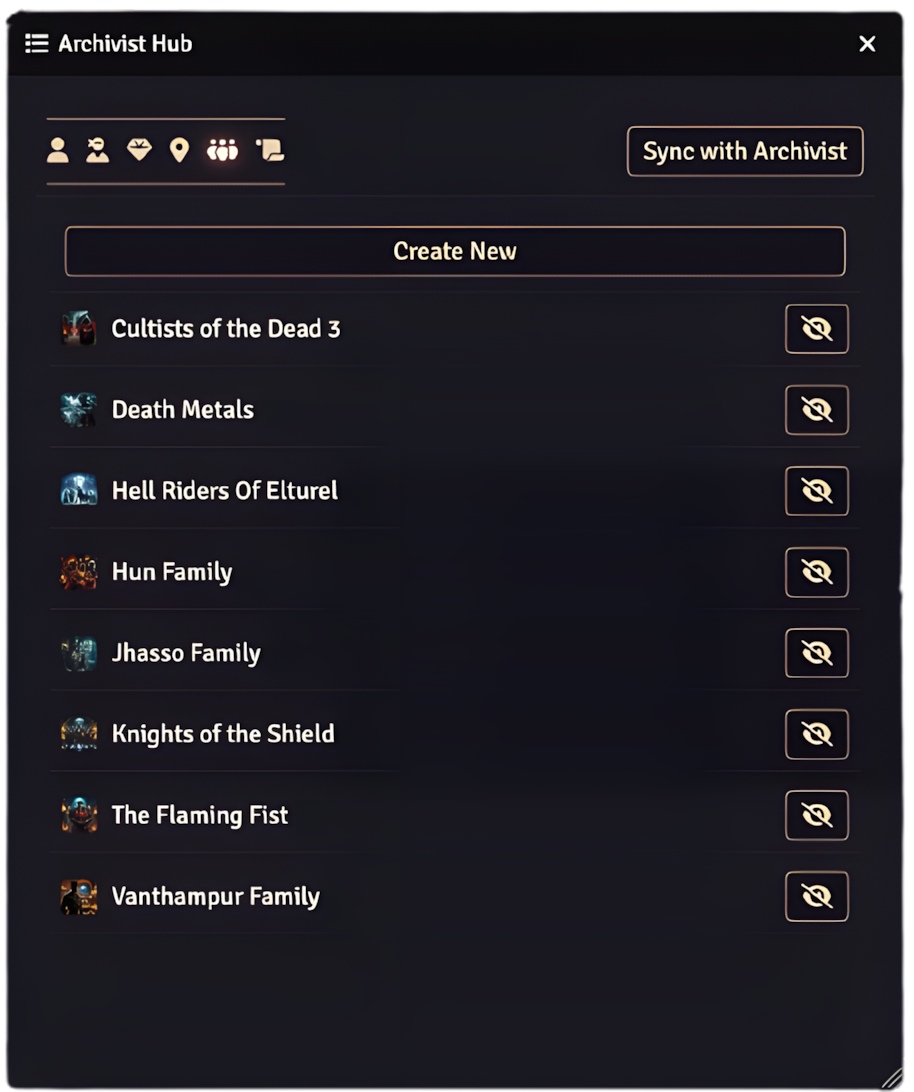
- Archivist Hub: A consolidated hub window with tabs for PCs, NPCs, Items, Locations, Factions, and Recaps, including quick open, permission toggle, and a "Sync with Archivist" button.
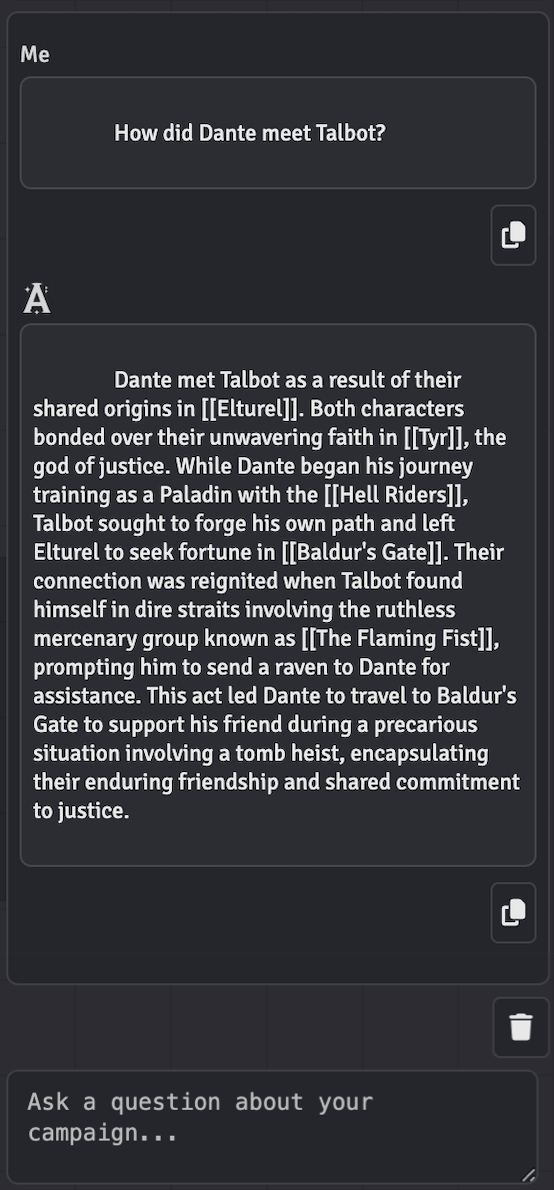
- Ask Archivist Chat (Sidebar): A streaming RAG chat tab appears in the Foundry sidebar once the world is configured and initialized.
- Real‑Time Sync (always on): GM clients automatically POST/PATCH/DELETE supported entities and links as you create/update/delete them in Foundry.
- Safe Markdown Handling: HTML from Foundry is normalized to Markdown for API writes; Markdown from Archivist is converted to sanitized HTML when writing back to Foundry.
- Journal Sheets & Linking: Custom journal sheets for Characters (PC/NPC), Items, Locations, Factions, and Recaps with drag‑and‑drop linking between sheets. Links are bidirectionally synchronized with Archivist. Location nesting is supported via parent/child and associative links. GM-only Notes tab on every sheet.
- Projection (optional): System‑agnostic projection of Archivist descriptions into core Actors/Items/Scenes using adapters and heuristics; falls back to a sidecar Journal page.
- Download this repository.
- Place it in your Foundry data folder at
Data/modules/archivist-sync/. - Restart Foundry and enable the module in your world’s Module Settings.
Foundry v14 (current line):
https://github.com/camrun91/archivist-sync/releases/download/v14-latest/module.json
Foundry v13 (legacy line, maintained on release/v13):
https://github.com/camrun91/archivist-sync/releases/download/v13-latest/module.json
Each
*-latestURL becomes live with the first stable release on its track. Until then, existing v13 installs continue to work throughhttps://github.com/camrun91/archivist-sync/releases/latest/download/module.json, which stays pinned to the v13 line.
Want to try the latest features before they're officially released? Install the beta channel with automatic updates:
Beta Manifest URL (with auto-updates):
https://github.com/camrun91/archivist-sync/releases/download/beta-latest/module.json
Installation:
- In Foundry VTT, go to Add-on Modules
- Click Install Module
- Paste the beta manifest URL above
- Click Install
✨ Automatic Updates: Once installed, Foundry will automatically detect and prompt you to install new beta releases. No need to reinstall or change the manifest URL!
When you first load a world with the module enabled, the World Setup wizard will launch automatically. You can also launch it manually via Game Settings → Module Settings → Archivist Sync → "Run World Setup Again".
The wizard guides you through:
- API key validation (stored as a world setting, obfuscated in the UI)
- Loading your Archivist campaigns
- Selecting the campaign to link
- Importing existing Archivist content into Foundry (Characters, Items, Locations, Factions, and Recaps)
When you complete setup, the world is marked "initialized", which enables the sidebar chat and activates real-time sync for supported documents.
After initialization, an "Archivist Chat" tab appears in the Foundry sidebar. It streams responses as you type. Chat availability requires all of:
- API key configured
- An Archivist campaign selected
- World initialization completed via the setup wizard
Open the Archivist Hub from Scene Controls or the Journal directory header button. The hub provides:
- Tabs for PCs, NPCs, Items, Locations, Factions, and Recaps
- Quick open and permission toggle for each entry
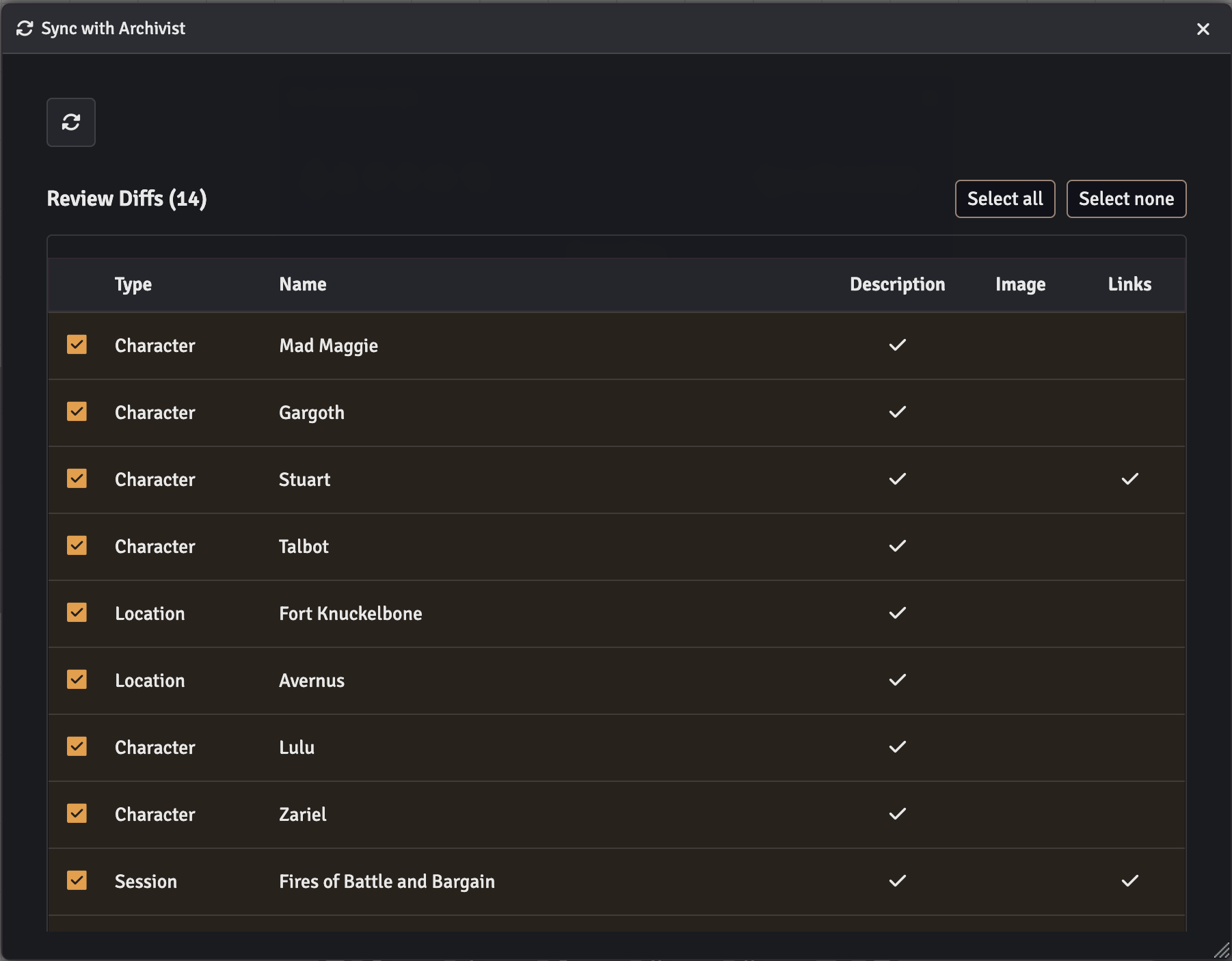
- "Sync with Archivist" button to reconcile your world:
- Create any missing Character (PC/NPC), Item, Location, Faction, and Recap sheets
- Update sheet titles and info when changed in Archivist
- Reconcile structural Location parent/child via
parent_id - Synchronize sheet‑to‑sheet links to match Archivist Links
The GM client automatically mirrors CRUD events and link changes to Archivist:
- Create/Update/Delete: Characters (PC/NPC), Items, Locations, Factions
- Link/Unlink: Bidirectional link synchronization when dragging sheets or unlinking
- Notes:
- Runs only for GMs and only when a campaign is selected
- Images are submitted only if the source is an https URL
- Recaps are read-only for create/delete operations
The module provides custom journal sheets to organize and link your campaign data:
- Character: PC/NPC overview sheet with linked Actor support (drop onto active Scene), character info, and relation tabs (PCs, NPCs, Factions, Items, Locations)
- Item: Item summary sheet with linked Item support and relation tabs
- Location: Supports structural nesting (parent_id), ancestor/descendant trees, associative Location↔Location links, and linked Scene support (toggle active Scene)
- Faction: Faction summary sheet with relation tabs
- Recap: Session summary page bound to an existing Game Session (edits apply through real-time sync - create/delete are local to Foundry and will not create/delete Game Sessions in Archivist)
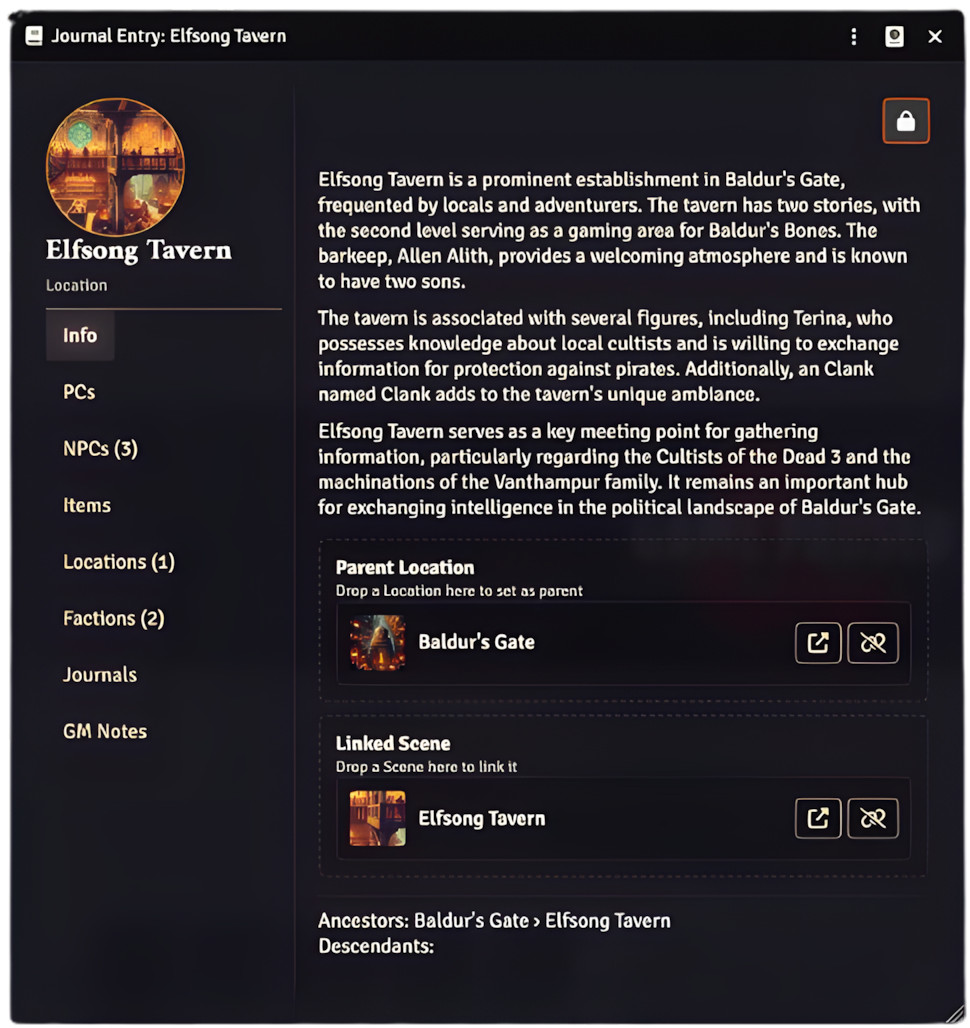
All sheets include:
- GM Notes tab: Private notes visible only to GMs with rich text editing
- Drag‑and‑drop linking: Drop any custom sheet, Journal entry, or Journal page, onto another to create bidirectional links
- Real-time sync: Link/unlink actions automatically create/delete Link records in Archivist
- Structural hierarchy: Uses the Location
parent_idchain to build parent/child relationships - Associative links: Non‑hierarchical relations between locations for cross‑reference
Available in Game Settings → Module Settings → Archivist Sync:
- API Key (world): Your Archivist API key (obfuscated in the UI for security)
- Allow GM private journal context in chat (world): When enabled, GM chat requests include private journal context during retrieval; non-GM requests never include it.
- Run World Setup Again (menu): Reset initialization and relaunch the setup wizard
- Projection: Sidecar Only (world): When enabled, never modify core system data fields; store descriptions only in sidecar journals.
The module communicates with the Archivist API:
- Base URL:
https://api.myarchivist.ai/v1 - Auth Header:
x-api-key: <YOUR_API_KEY> - Supported Operations:
- Characters, Items, Locations, Factions: CREATE, READ, UPDATE, DELETE
- Links: CREATE, READ, DELETE (bidirectional sync between sheets)
- Sessions (Recaps): READ, UPDATE (title/summary only; no create/delete)
- Ask (RAG Chat): POST to
/askwith streaming support
Examples (representative; bodies vary by type):
// Create Character
{
  "character_name": "Elowen",
  "description": "...markdown...",
  "image": "https://...",
  "campaign_id": "<id>"
}
// Ask (RAG chat)
{
"campaign_id": "<id>",
"messages": [
{ "role": "user", "content": "Who is the duke?" }
],
"stream": true,
"gm_permissions": false
}- Foundry VTT: v14 (minimum 14.359; verified 14.359)
- Game Systems: System-agnostic with built-in adapters for common systems
- The API key is stored as a world-scoped setting and obfuscated in the UI.
- Real‑Time Sync and the "Sync with Archivist" button execute only on GM clients.
- The sidebar chat is available to all users once the world is configured and initialized.
- GM chat requests can include private journal context during retrieval when the GM setting is enabled; non-GM requests always send
gm_permissions: false. - All requests use HTTPS endpoints with CORS-safe headers and exponential backoff on
429and network failures.
- “Chat not available”: Ensure API key is set, a campaign is selected, and the world has been initialized via the setup wizard.
- “Rate limited (429)”: The module automatically retries with exponential backoff and jitter; wait and retry if necessary.
- “CORS error”: Your server must allow browser requests from your Foundry origin for API routes.
- “Images missing”: Only https image URLs are sent to Archivist; local file paths are ignored for API writes.
- Install Node.js 18.x or 20.x (or use
.nvmrcwithnvm use) - Install dependencies:
npm install
This project uses ESLint and Prettier for code quality and formatting:
# Check for linting issues
npm run lint

# Auto-fix formatting issues
npm run lint:fixGitHub Actions automatically runs on all pushes and pull requests:
- Linting: Checks code style and catches common errors
- Validation: Ensures module.json is valid and required files exist
- Files:
scripts/modules/projection/adapter-registry.jsscripts/modules/projection/slot-resolver.jsscripts/modules/projection/merge.js
- Runtime API:
window.ARCHIVIST_SYNC.projection()→ returns resolver withpickDescriptionSlot(doc)andprojectDescription(doc, html)
See CONTRIBUTING.md for more details.
archivist-sync/
├── module.json
├── package.json                             # Dependencies and scripts
├── .eslintrc.json                           # ESLint configuration
├── .prettierrc.json                         # Prettier configuration
├── scripts/
│   ├── archivist-sync.js                    # Module bootstrap (sidebar tab, availability, RTS listeners, hub, setup)
│   ├── modules/
│   │   ├── config.js                        # Constants and setting keys
│   │   ├── settings-manager.js              # Registers settings and availability checks
│   │   ├── journal-manager.js               # Journal entry creation and updates
│   │   ├── utils.js                         # Utility functions (HTML/Markdown conversion, etc.)
│   │   ├── links/
│   │   │   ├── helpers.js                   # Sheet link helpers (flags + bidirectional updates)
│   │   │   └── indexer.js                   # In‑memory link index (fast lookups from local flags)
│   │   ├── sheets/
│   │   │   └── page-sheet-v2.js             # DocumentSheetV2 custom sheets (Entry/PC/NPC/Item/Location/Faction/Recap)
│   │   ├── toc/
│   │   │   └── toc-window.js                # Archivist Hub window (ApplicationV2)
│   │   ├── reconcile/
│   │   │   └── reconcile-service.js         # Full sync reconciliation service
│   │   └── adapters/
│   │       └── system-adapter.js            # System-specific field adapters
│   ├── services/
│   │   └── archivist-api.js                 # API client with throttling and retries
│   ├── dialogs/
│   │   ├── world-setup-dialog.js            # Guided setup wizard
│   │   └── ask-chat-window.js               # Sidebar chat UI logic
│   └── sidebar/
│       ├── ask-chat-tab.js                  # Sidebar tab registration
│       └── ask-chat-sidebar-tab.js          # Sidebar chat component
├── templates/                               # Handlebars templates (sheets, hub, dialogs)
└── styles/archivist-sync.css
MIT
- Issues: Report bugs or feature requests on the GitHub Issues page
- Documentation: Visit developers.myarchivist.ai for API reference
Please see CONTRIBUTING.md for detailed contribution guidelines, including:
- Development setup
- Code style requirements
- Pre-commit checklist
- Pull request process
Remember to update module.json URLs (url, manifest, download, bugs) to point to your repository and releases.