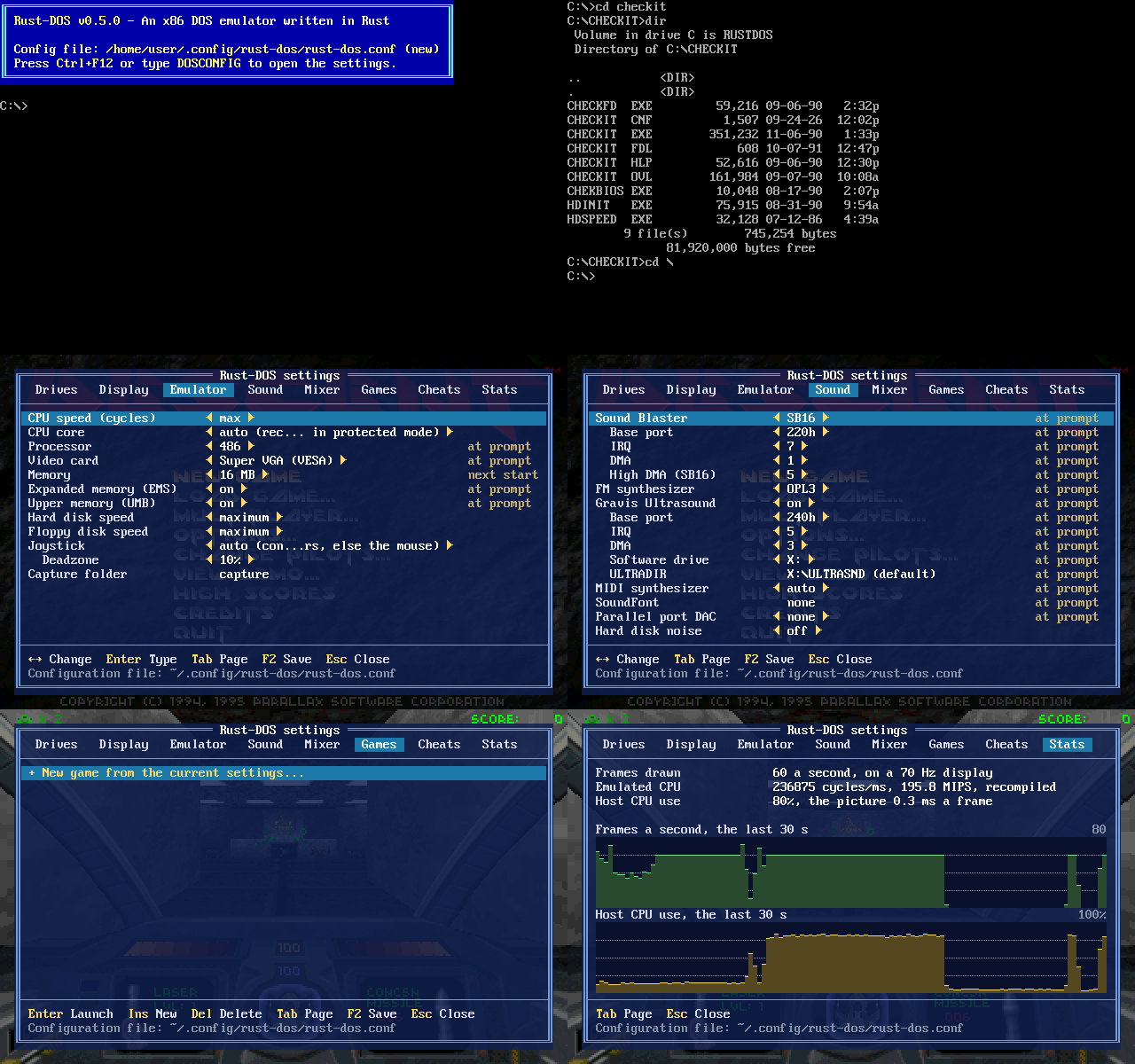
Rust-DOS is a DOS emulator aimed at the golden age of DOS gaming from the early days up to the dawn of Windows95. It is a work in progress and some games and programs may not run yet.
Rust-DOS is looking for contributors!
I wanted to learn more about the nuances of DOS emulation. Also, there's only one other DOS emulator written in Rust, and that one hasn't seen any development in 5 years and was using lots of unsafe{} code blocks.
- CPU: 386, 486 and Pentium with FPU, protected mode, paging and virtual-8086 mode for DOS extenders such as DOS/4GW (Descent, Heretic), and a dynamic recompiler for x86-64 and ARM64 hosts (see docs/dynrec.md)
- DOS built in: no DOS or BIOS images needed. XMS, EMS and upper memory
(
LOADHIGH), a mouse driver, keyboard layouts, and a DOS prompt with batch files and aCOMMAND.COMprograms can shell out to - Graphics: text, CGA with composite artifact colours, EGA, VGA with Mode X, VESA VBE 2.0 up to 1024x768, an S3 Trio64 with its 2D accelerator, Hercules, the Tandy 1000's and IBM PCjr's 16-colour modes, and a 3dfx Voodoo Graphics for Glide games in DOS and Windows 95, drawn by Rust-DOS or again by OpenGL at up to four times its resolution
- Sound: Sound Blaster 16, Pro 2 and 2.0 with OPL3 FM music, Gravis Ultrasound with a built-in patch set, General MIDI through a SoundFont, the Ultrasound patches, a Roland MT-32 (via munt) or the host's MIDI ports, Covox and Disney Sound Source, the Tandy/PCjr sound chip, and CD audio
- Drives: host directories as floppy, hard disk and CD-ROM drives, CD
images (CUE with BIN, WAV, MP3, OGG or FLAC tracks, ISO) and FAT12/FAT16
disk images, with DOSBox Staging's
MOUNT(andIMGMOUNT), and emulated disk speeds and noises - Booting disk images
(
BOOT): MS-DOS, Windows 95 and other systems of their own, with a Plug and Play BIOS, APM and a PCI bus - Display: CRT shaders (scanlines, aperture grille, curved shadow mask) and monochrome monitors (white, amber, green)
- Settings window (Ctrl+F12) that changes most settings without a restart, the display adapter included, and saves them to the configuration file
- Game profiles with settings and start commands of their own, and import of GOG and DOSBox games
- Save states (nine slots per game) and rewind
- Cheats: find a game's values in memory, and change or freeze them
- Capture: screenshots, and sound, video and GIF recordings
- Joysticks from game controllers, or the mouse as one
- Runs in a web browser as WebAssembly
- A web-based debugger and HTTP API
Download Rust-DOS for Windows, macOS, Linux or the browser from the releases page; its notes say which file to take.
To build it yourself, install Rust and SDL2's development files
(libsdl2-dev and libasound2-dev on Debian and Ubuntu, brew install sdl2
on macOS), then:
cargo build --release
./target/release/rust-dos -d ~/dos
-d makes a host directory drive C:; without it, C: is the configuration
file's, or the current directory. Drop a game's folder, a GOG install, a zip
archive, or a CD or disk image onto the window to mount, import or run it.
rust-dos --help lists the other options.
Rust-DOS reads rust-dos.conf, a DOSBox-style configuration file, from the
current directory or the per-user configuration directory
(~/.config/rust-dos/ on Linux), and writes a commented template there on
first start. The settings window (Ctrl+F12, or DOSCONFIG at the prompt)
changes most settings without a restart, and F2 saves them to the file.
CONFIGURATION.md describes it all:
- the configuration file and every
setting in it, including the startup commands in
[autoexec] - the settings window
- game profiles, and importing games set up for DOSBox or GOG
- mounting drives, disk images and disk speed and noises
- CRT shaders
- command-line options
.BAT files run as COMMAND.COM runs them, a line at a time, with %0 to
%9 for the parameters, %NAME% for environment variables, ECHO OFF and
@, :labels, GOTO, IF [NOT] ERRORLEVEL n, IF [NOT] EXIST file,
IF [NOT] a==b, FOR %%v IN (set) DO, SHIFT, CALL, PAUSE and
CHOICE. A batch file started from another takes its place unless it is
CALLed, and Ctrl+C between two lines ends them. The configuration's
[autoexec] and a game profile's commands run as batch files too, before
C:\AUTOEXEC.BAT.
A program or batch file is found in the current directory and then in
PATH (C:\;Z:\ to begin with); without an extension, the first .COM,
.EXE or .BAT of that name. Z:\COMMAND.COM is the COMSPEC, which
programs that shell out to DOS run (C:\COMMAND.COM works too). Besides
programs, the prompt has these commands:
| Command | What it does |
|---|---|
DIR [path], LS [/A] [path] |
list files, LS in wide columns |
CD [path], D: |
change the directory, or the drive |
TYPE file |
show a text file |
COPY source[+source...] [destination] [/A|/B] |
copy files, with wildcards, or join them into one |
DEL file, ERASE file |
delete files, all of a directory's when given one |
REN old new, RENAME |
rename files, with wildcards (REN *.TXT *.BAK) |
MD dir, MKDIR, RD dir, RMDIR |
make and remove directories |
VOL [d:] |
a drive's label and serial number |
KEYB [code] |
type in another keyboard layout, or show which |
DATE [mm-dd-yy], TIME [hh:mm[:ss]] |
set the machine's date or time, or show it |
CLS, VER, ECHO, SET, PATH, PROMPT |
as in DOS |
MOUNT, IMGMOUNT |
see Mounting drives |
MAKEIMG |
make a new floppy or hard disk image, as in DOSBox Staging; see New disk images |
BOOT [image ...] [-l drive] |
start a system from a disk image; see Booting a disk image |
MIXER |
see [mixer] |
LOADHIGH (LH) |
load a program into upper memory |
MEM [/C|/D|/F|/M name] |
the memory used and free, as in MS-DOS 6.22; /C lists the programs in memory, /F the free blocks, /M one program's blocks and /D all of them |
DOSCONFIG |
open the settings window |
EXIT |
quit Rust-DOS, or go back from COMMAND |
COMMAND [/C command | /K command] |
a second prompt, until EXIT; /C runs the command and goes back, /K runs it and stays |
>file, >>file and <file redirect a command's output and a program's
input; there are no pipes. PROMPT takes DOS's $ codes ($P$G is the
default). At the prompt, Up and Down step through the last 100 lines typed,
and Ctrl+C gives up the line being typed.
| Key | Action |
|---|---|
| Ctrl+F12 | Open or close the settings window |
| Ctrl+Shift+F12 | Show or hide the performance overlay: the frames a second and the host's CPU use, with small graphs, at the bottom right |
| Ctrl+F1 | Save the machine to the current save state slot |
| Ctrl+F2 | Load the current slot |
| Ctrl+F3 | Pick the next slot (it says what is in it) |
| Ctrl+Shift+F3 | Pick the previous slot |
| Ctrl+F9 | Open the settings window on the save states |
| Ctrl+F4 | Put the next disk in the drives mounted from lists of images |
| Alt+Pause | Pause the machine, and resume it |
| Alt+F12 (held) | Fast forward: the machine runs up to eight times as fast, without sound |
| Alt+F11 (held) | Rewind: go back in time, half a second every third frame (with rewind=true) |
| Ctrl+F11 | Slow the CPU down by a tenth (from max, from the speed it reached) |
| Ctrl+Shift+F11 | Speed the CPU up by a tenth |
| Ctrl+F8 | Turn the sound off and on (in the browser, the page's Sound button) |
| Ctrl+F10 | Capture the mouse for the program, and let it go; a click captures it too once a program uses the mouse |
| Alt+Enter | Switch between the window and fullscreen |
| Ctrl+F5 | Save a screenshot (PNG), with the settings window and the performance overlay if they show and record_ui is on |
| Ctrl+F6 | Start and stop recording the sound (WAV) |
| Ctrl+F7 | Start and stop recording video with sound (AVI) |
| PrintScreen | Start and stop recording an animation (GIF) |
Screenshots and recordings go in capture_dir (capture in the directory
Rust-DOS started in).
A save state is the whole machine at one moment: the processor, memory,
screen, sound cards and music, DOS's open files, and where a batch file had
got to. Ctrl+F1 saves to the current slot, Ctrl+F2 loads it, and
Ctrl+F3 and Ctrl+Shift+F3 pick one of the nine slots; the settings
window's States page (Ctrl+F9) shows when each was saved, and a picture.
A game profile has slots of its own, in
states/<game> beside the configuration file; otherwise they are in
states/dos.
- Loading a state puts its hardware settings back first. A state of a
machine with another memory size (
memsize) isn't loaded. - Files on the host and in disk images aren't part of a state: what a program wrote since stays written, as in DOSBox. A system booted from a disk image is the exception: its disks go back with its state.
- The FM chip and MIDI synthesizers are told their registers and instruments again, so notes that were playing start again.
web/ builds Rust-DOS for the browser as a WebAssembly module and a page
that runs it, in web/www. It needs the wasm32-unknown-unknown Rust target
and the wasm-bindgen program in the version web/Cargo.lock has (the build
script says which); wasm-opt is used if it is installed.
rustup target add wasm32-unknown-unknown
./web/build.sh
python3 -m http.server -d web/www
Then open http://localhost:8000/. web/www is the whole site, for any web
server that serves .wasm as application/wasm; releases include it as
rust-dos-<version>-web.zip.
- C: is a 250 MB hard disk image kept in the browser's storage. Drop files,
folders or
.ziparchives on the page (or use Add files and Add folder) to copy them to C:, and floppy, CD or hard disk images to insert them. Drives inserts and ejects images, and downloads or erases C:. - Settings opens the settings window,
and Config file edits
rust-dos.confas text; the browser keeps both. There are no host directories to mount. - Save states, screenshots (Screenshot) and video recordings (Record, WebM or MP4) work as in the program; rewind doesn't.
- Gamepads work as joysticks once a button is pressed on them. On phones and tablets, Touch shows a D-pad and buttons, a finger moves the mouse like a trackpad, and Keyboard shows a PC keyboard.
- Clicking the screen while a program uses the mouse captures it; Ctrl+F10 or Esc releases it. Sound starts with the first key press or click.
The page takes parameters: ?zip=URL copies an archive to C: at startup,
?run=COMMAND types a command at the first prompt (both can repeat), and
?game=NAME launches a game profile, for example
?zip=games/keen.zip&run=cd%20keen&run=keen1. ?persist=0 keeps C: in
memory only, ?log sends the log to the browser console, and
?renderer=2d draws without WebGL 2 (and so without the CRT shaders).
--debug-server starts a local HTTP/WebSocket interface on
127.0.0.1:8086 (or --debug-server ADDR) for scripted and LLM-driven
debugging. It has no authentication, so keep it on localhost.

Open the address in a browser for the debugger: the screen with remote
input, pause, step and run to an address, the disassembly with breakpoints,
the registers, memory, stack and watchpoints, and the log, the instruction
trace and the rest of the machine's state. For scripts, curl localhost:8086/ lists every endpoint:
curl 'localhost:8086/api/screen/text?format=text'
curl -XPOST -H content-type:application/json -d '{"text":"dir\n"}' localhost:8086/api/input/type
curl -o screen.png localhost:8086/api/screenshot
curl 'localhost:8086/api/memory?addr=DS:SI&len=64'
Set SDL_VIDEODRIVER=dummy SDL_AUDIODRIVER=dummy to run without a window or
sound device. docs/llm-debugging.md is a guide to
using it.
Rust-DOS logs what it does to Rust-DOS.log in the
per-user configuration directory: the
programs it runs, DOS and BIOS functions and I/O ports it doesn't emulate,
failed file operations, CPU exceptions and configuration warnings. Attach it
to bug reports. It is replaced on every start and stops growing at 64 MB.
Rust-DOS is standing on the shoulders of giants. This would not have been possible without the incredible work of these open-source projects:
- Dosbox - The original that paved the way and laid the foundations. A lot of knowledge was preserved in it that would otherwise be forgotten now.
- Dosbox Staging - The modern continuation where a lot of care and attention was given to staying authentic to the era and provide a stable emulator used by GOG and others. Staging was and is a major source of foundational knowledge and advanced concepts such as dynamic recompilation.
- Dosbox-X - Many innovations and new features were spearheaded here: More processors, Win9X, a built-in UI. This project did a lot of the hard work Rust-DOS now benefits from.
Both local and hosted LLMs (usually advertised as "Generative AI") were used in the development of this software. Contributions written using LLMs are ok provided the following rules are observed:
- Read and review generated code. You should be able to answer questions about your contribution.
- Document and comment non-trivial parts of the code.
- Test your contribution using actual games and programs.
- Don't use LLMs for trivial things like changing a constant. This is slow, wasteful and runs the risk of unnecessary modifications elsewhere.
- Use modern, sufficiently sized models with sufficient context size. Running small or outdated models or limiting them to small contexts results in low quality code and damage to existing functionality.
- Usage of locally-hosted LLMs is encouraged, but not required.
- Please keep commits as vendor-neutral as possible, i.e. put skills into the
docsdirectory and reference them.
Rust-DOS is licensed under the GNU General Public License, version 2 or later (see LICENSE).