

Mellow Visual Timer is a user-friendly, customizable web-based timer application designed to help users efficiently manage their time. It features a base timer, a timer list for creating predefined timers (basic timers), and a routine timer to sequentially execute timers—making it perfect for techniques like the Pomodoro method. The app also provides focus statistics, shareable achievement cards, customizable themes, and flexible timer and sound settings.
👉 Try it out | Experience Mellow Visual Timer and take control of your time effectively!

- Set the Timer:
- Use the unit toggle button to switch between minutes and seconds.
- Drag on the clock face or click to set your desired time quickly and easily.
- Create Your Own Timers:
- Save your frequently used timers as Basic Timers in the Timer List.
- Combine multiple Basic Timers into a Routine Timer for sequential execution, then edit, reorder, or remove its individual steps.
- Start the Timer:
- Press the Play button and watch the timer progress in real-time.
- The timer will continue running even if you switch tabs or minimize the app.
- Stay Notified:
- A popup notification and alarm sound will alert you when the timer finishes.
- Set a preset or uploaded audio file, then adjust its volume in Timer & Sound settings.
- Track Your Focus:
- Review today's focus time, seven-day total, completed session history, and current streak.
- Download a shareable daily achievement card from Focus Stats & Share settings.
- Switch Between Modes:
- The app automatically optimizes its layout for both portrait and landscape modes.
- Quickly set a timer by dragging and clicking on the clock interface.
- Ideal for simple, immediate use without additional setup.
- Basic Timer
- Create single timers with predefined durations and custom colors.
- Routine Timer
- Group multiple Basic Timers to run sequentially.
- Add, edit, reorder, or remove individual timer steps, including each step's duration, color, and alarm interval.
- Start a routine once or enable repeat mode while it runs.
- Use cases:
- Pomodoro sessions (e.g., 50-minute focus + 10-minute break).
- Workout routines with different exercises and rest periods.
- Extending beyond the default 60-minute limit by chaining timers together.
- Automatically records completed focus sessions.
- View today's focused time, a seven-day total, session history, and day streaks.
- Generate a shareable daily achievement card for social media.
- Choose from five built-in themes:
- Beige Green
- Gray Purple
- Black Green
- Sky Blue
- Lovely Pink
- Adjust the color of the timer disk independently for a personalized look.
- It is also possible to create your own custom themes.
- Set the timer direction to clockwise or counter-clockwise from one settings tab.
- Choose a preset alarm tone, control its volume, or upload a custom audio file.
- Prevents the screen from turning off while the timer is running, ensuring uninterrupted visibility during tasks like workouts or study sessions.
- Even when the app is in the background, the timer continues to function.
- Notifications provide real-time updates on the remaining time or when the timer finishes.
- Close the timer using the ESC key or cancel actions with the back button—supporting both web and app-like usage.
- Automatically adjusts the layout based on device orientation for a more user-friendly experience.
-
Fully functional on both web and mobile platforms.
<details> <summary><strong>Install as a web app</strong> for an app-like experience on desktop and mobile devices.</summary> - On **desktop**, click the monitor icon in the address bar on Chrome to install. 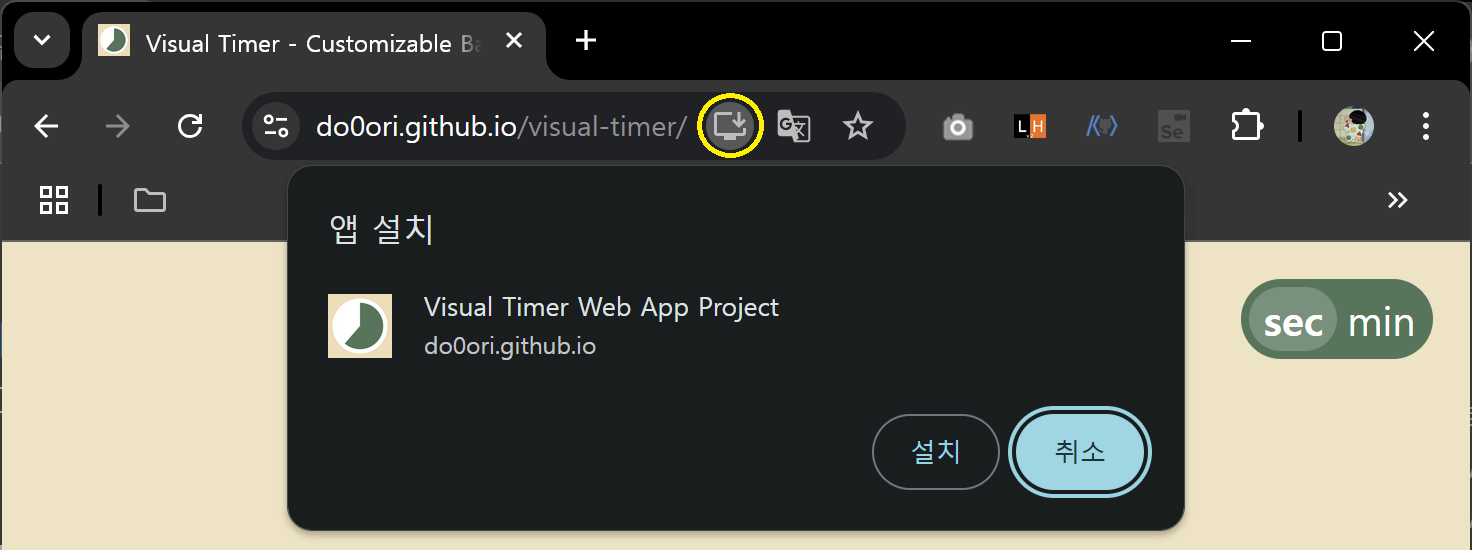 - On **mobile**, a prompt will appear automatically to install the app: 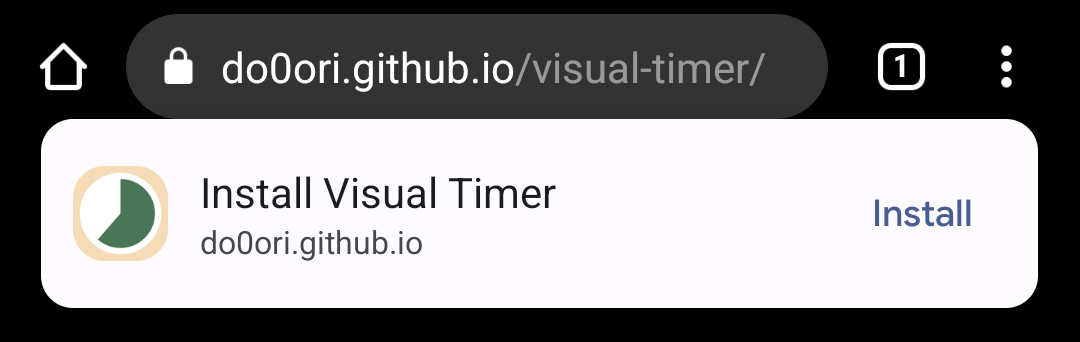 - If not, use the menu (three dots) to find the mobile icon with "Install App" or "Add to Home Screen" option: 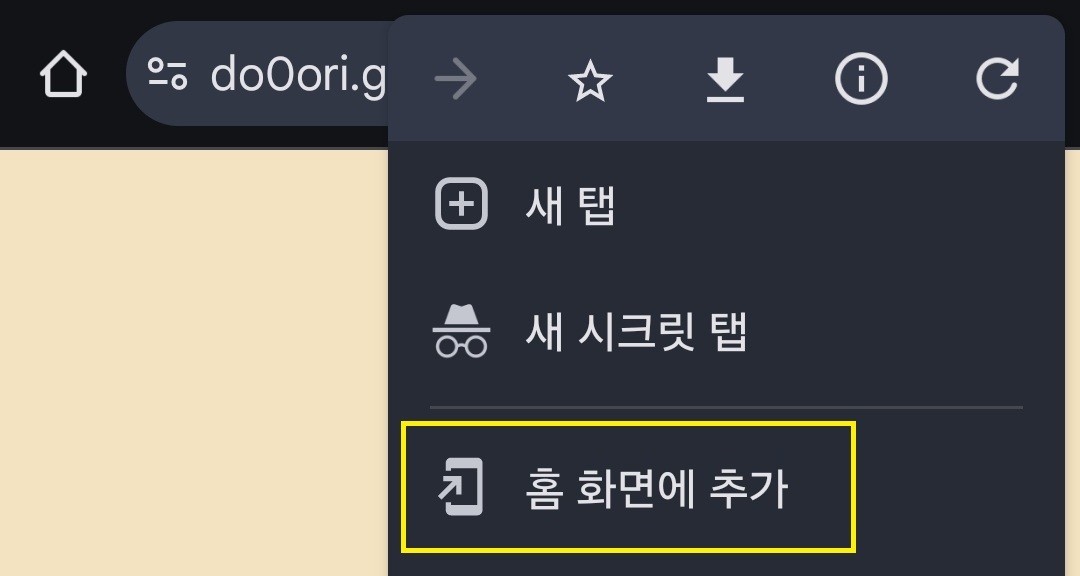 </details>
| Browser | Support |
|---|---|
 Chrome Chrome |
○ |
 Edge Edge |
○ |
 Firefox Firefox |
○ |
 WebView Android WebView Android |
○ |
 iOS Safari iOS Safari |
△ |






- UI & routing: React 18, React Router 7, Headless UI, React Icons
- State & forms: Zustand 5, React Hook Form
- Build & styling: Vite 6, TypeScript 5, Tailwind CSS 3
- Offline support: Vite PWA and Workbox
-
Clone the repository:
git clone https://github.com/do0ori/visual-timer.git
-
Navigate to the project folder and install dependencies:
cd visual-timer npm install -
Copy
.env.exampleto.envand setVITE_TIMER_NOTIFICATION_API_URLto enable background alert testing locally. -
Start the development server:
npm run dev
-
Create a production build or preview it locally:
npm run build
npm run preview
Contributions are welcome! To contribute:
- Fork the repository.
- Create a new branch for your feature/bug fix.
- Submit a pull request with a clear description of your changes.
Feel free to open issues for bug reports or feature suggestions.
- v0.5.0: Reliable background timer alerts through Web Push, persistent controllable custom alarm audio, and accurate end-time-based countdowns.
- v0.4.1: Stoppable alarm previews, app-theme-driven editor surfaces, wider desktop timer cards, and an aligned Routine Timer interactive dial.
- v0.4.0: A streamlined Routine Timer editing flow with clearer step creation, inline editing, reordering, deletion, context-aware timer creation, and compact timer cards.
- v0.3.0: Vite migration, focus stats, custom alarm audio, unified settings, updated themes, and version information.
See CHANGELOG.md for detailed release notes.