MCP server to enable AI agents to interact with data from kcapp.
go build -o mcp .docker build -t kcapp-mcp .
docker run -e KCAPP_API_URL=http://your-kcapp-host:8001 \
-e KCAPP_MCP_TRANSPORT=http \
-p 8080:8080 \
kcapp-mcpSee the docker-compose.yaml file
| Env var | Default | Description |
|---|---|---|
KCAPP_API_URL |
http://localhost:8001 |
URL of the kcapp API |
KCAPP_MCP_TRANSPORT |
stdio |
Transport mode: stdio or http |
KCAPP_MCP_PORT |
8080 |
Port to listen on (HTTP transport only) |
Add the following to claude_desktop_config.json:
  "mcpServers": {
    "kcapp": {
      "command": "/path/to/mcp",
      "env": { "KCAPP_API_URL": "http://localhost:8001" }
    }
} "mcpServers": {
"kcapp": {
"type": "http",
"url": "http://your-host:8080/mcp"
}
}There are tools for getting information about matches, players, statistics, tournaments and more. Once configured the sky is the limit!
Prompt:
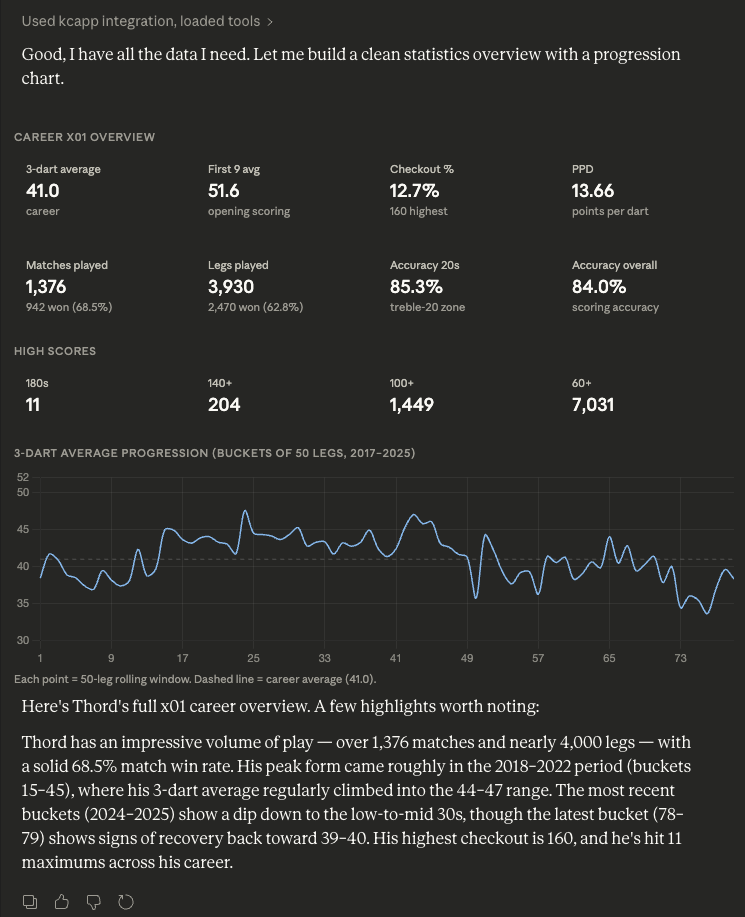
Could you give me statistics overview in x01 for Thord
Output:
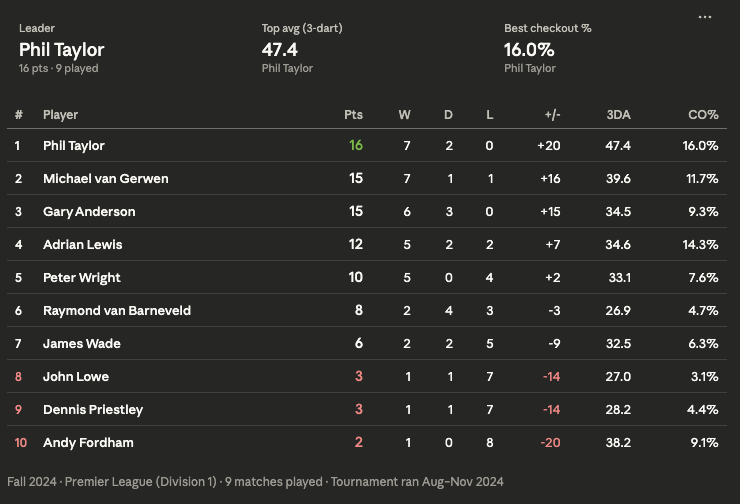
This is data from a real tournament played in kcapp, but with players anonymized for privacy
Prompt:
Could you give me an overview of the Premier League group in the Fall 2024 tournament?
Output: