You signed in with another tab or window. Reload to refresh your session.You signed out in another tab or window. Reload to refresh your session.You switched accounts on another tab or window. Reload to refresh your session.Dismiss alert
SMBstack is an open-source Samba stack installer for Debian/Ubuntu. It deploys a shared folder with Recycle Bin, full audit logging via rsyslog, a web-based audit viewer, and a shared folder browser — all configured interactively through a single installer script.
SMBstack es un instalador de stack Samba de código abierto para Debian/Ubuntu. Despliega una carpeta compartida con Papelera de Reciclaje, auditoría completa vía rsyslog, un visor web de auditoría y un explorador web de la carpeta compartida — todo configurado de forma interactiva a través de un único script instalador.
Web Interface
Main Menu
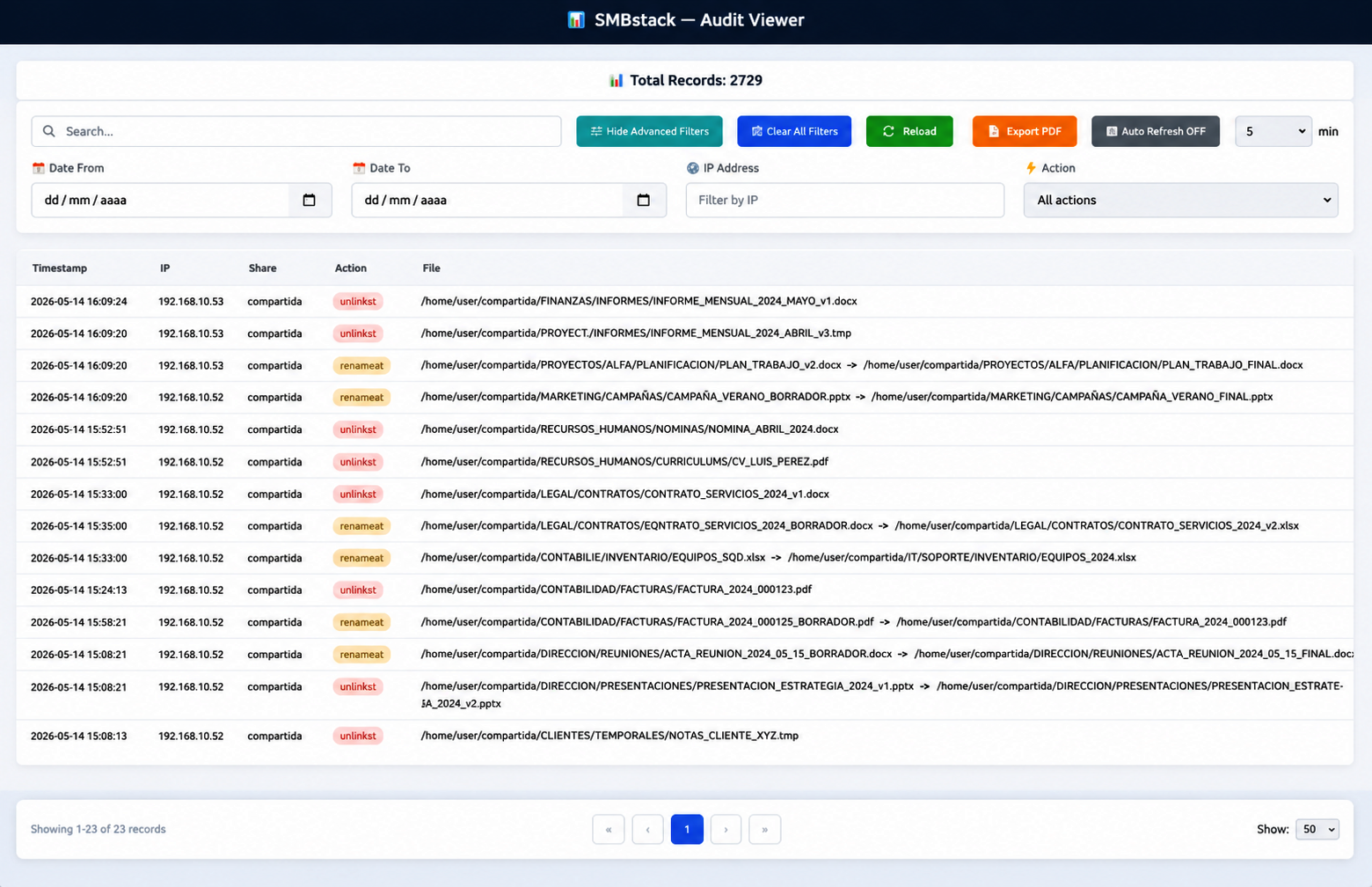
SMBaudit
The audit viewer (http://localhost:3092/audit) displays Samba activity logs in real time. It allows filtering by user, IP, action and status, pagination, and export to PDF.
El visor de auditoría (http://localhost:3092/audit) muestra los logs de actividad de Samba en tiempo real. Permite filtrar por usuario, IP, acción y estado, paginación y exportación a PDF.
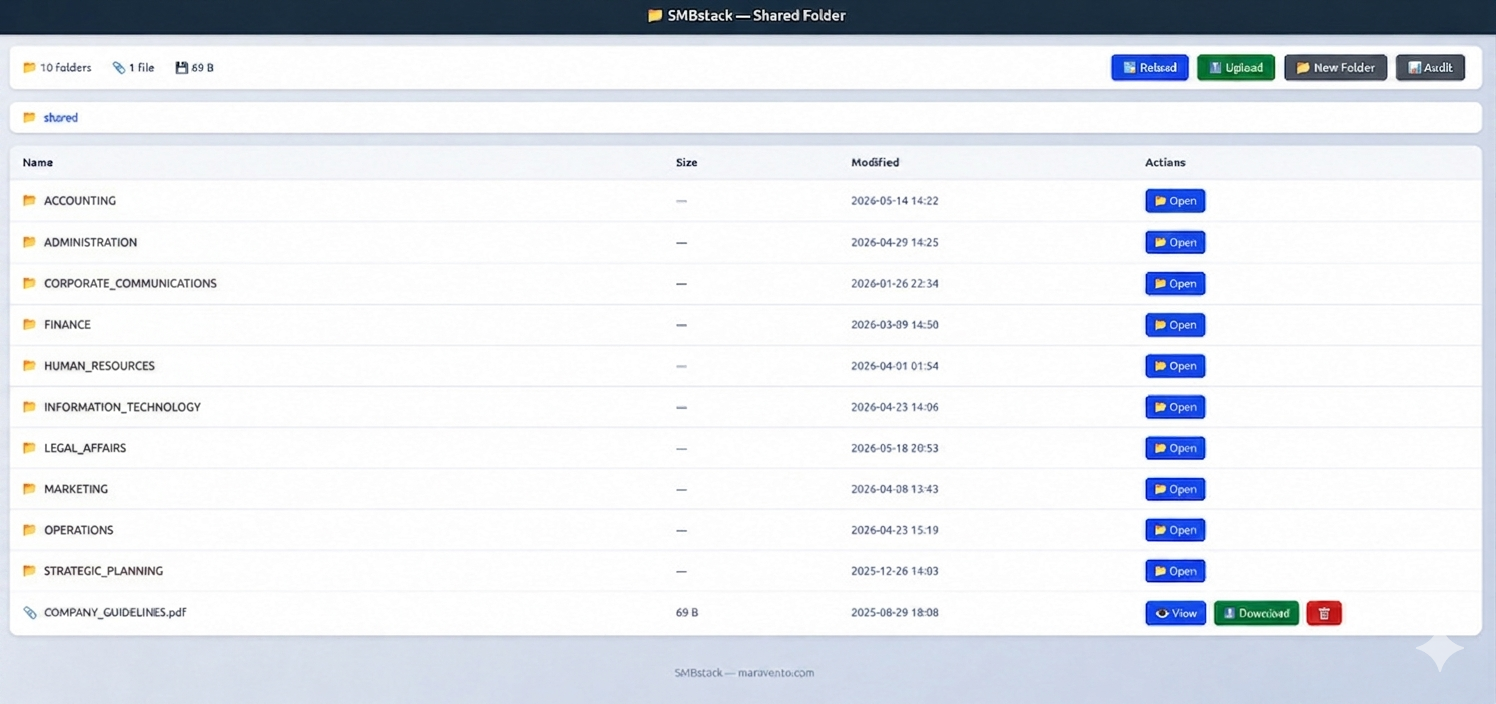
SMBshared
The shared folder browser (http://localhost:3092/) provides a unified interface with two tabs: Shared and Audit. The Shared tab allows navigating the shared folder structure, opening or downloading documents, and moving items to the recycle bin. Root-level folders are protected — items cannot be uploaded, created, or deleted from the root level.
El explorador de carpeta compartida (http://localhost:3092/) ofrece una interfaz unificada con dos pestañas: Shared y Audit. La pestaña Shared permite navegar la estructura de carpetas, abrir o descargar documentos y mover elementos a la papelera de reciclaje. Las carpetas de primer nivel están protegidas — no se pueden subir archivos, crear carpetas ni eliminar elementos desde la raíz.
Inside any subfolder, the toolbar allows uploading single or multiple files simultaneously, creating new folders, and reloading the view. All operations are recorded in the audit log with the client's IP address.
Dentro de cualquier subcarpeta, la barra de herramientas permite subir uno o varios archivos simultáneamente, crear nuevas carpetas y recargar la vista. Todas las operaciones quedan registradas en el log de auditoría con la IP del cliente.
Scope
What SMBstack does:
Installs and configures Samba with a shared folder, Recycle Bin and group permissions
Configures full audit logging via rsyslog to /var/log/samba/log.audit
Deploys a web-based audit log viewer at http://localhost:3092/audit
Deploys a web-based shared folder browser at http://localhost:3092/shared
Configures logrotate for all Samba logs
Installs a service watchdog (smbload.sh) via cron @reboot
Installs a shared folder size monitor (smbwatch.sh) — self-managed, independent of the installer
Saves installation config to /var/www/smbstack/smbstack.env for future updates
Optional NetBIOS support (disabled by default)
Lo que SMBstack hace:
Instala y configura Samba con carpeta compartida, Papelera de Reciclaje y permisos de grupo
Configura auditoría completa vía rsyslog en /var/log/samba/log.audit
Despliega un visor web de auditoría en http://localhost:3092/audit
Despliega un explorador web de la carpeta compartida en http://localhost:3092/shared
Configura logrotate para todos los logs de Samba
Instala un watchdog de servicios (smbload.sh) vía cron @reboot
Instala un monitor de espacio de la carpeta compartida (smbwatch.sh) — autogestionado, independiente del instalador
Guarda la configuración de instalación en /var/www/smbstack/smbstack.env para futuras actualizaciones
Soporte opcional de NetBIOS (deshabilitado por defecto)
Out of scope (not implemented):
Active Directory / domain controller
Multiple shared folders
Custom paths outside /home/$local_user/ (must be edited manually)
IPv6
LDAP
Fuera de alcance (no implementado):
Active Directory / controlador de dominio
Múltiples carpetas compartidas
Rutas personalizadas fuera de /home/$local_user/ (debe editarse manualmente)
git clone --depth=1 https://github.com/maravento/smbstack.git
cd smbstack
sudo bash smbinstall.sh
The installer will prompt for:
Prompt
Description
Shared folder name
Name for the shared folder (created under /home/$local_user/)
Samba server network
IP/network in CIDR format (e.g. 192.168.1.0/24)
Network interface
Selected from available interfaces listed
Samba username
Samba account to create
NetBIOS support
Optional, disabled by default
Overwrite smb.conf
Only asked if /etc/samba/smb.conf already exists
$local_user is the local Linux user detected automatically by the installer: the user logged into the console session, or SUDO_USER, or the first user found under /home/. It becomes the owner of the shared folder and the base name for the Samba account.
$local_user es el usuario local de Linux detectado automáticamente por el instalador: el usuario con sesión en consola, o SUDO_USER, o el primer usuario encontrado en /home/. Se convierte en el propietario de la carpeta compartida y el nombre base de la cuenta Samba.
Update & Uninstall
To update or uninstall SMBstack, download the updated repository, enter the folder and run:
Para actualizar o desinstalar SMBstack, descarga el repositorio actualizado, entra a la carpeta y ejecuta:
cd smbstack
sudo bash smbinstall.sh --update
# or | o
sudo bash smbinstall.sh --uninstall
File
--update
--uninstall
conf/smb.conf
⛔ not touched (user-customized)
✅ restored from .bak
conf/fullaudit.conf
⛔ not touched (user-customized)
✅ removed
web/smbweb.conf
⛔ not touched (user-customized)
✅ removed
web/smbaudit.html
✅ overwritten
✅ removed
web/smbapi.php
✅ overwritten
✅ removed
web/smbaudit-diagnostic.php
✅ overwritten
✅ removed
web/shared.php
✅ overwritten
✅ removed
tools/smbload.sh
✅ overwritten
✅ removed
tools/smbwatch.sh
✅ overwritten
✅ removed
/var/www/smbstack/smbstack.env
⛔ preserved
✅ removed
Shared folder (/home/$local_user/shared/)
⛔ never touched
⛔ never touched
--update only refreshes application code (web PHP/HTML viewers and tools/*.sh). Configuration files deployed at install time (smb.conf, fullaudit.conf, smbweb.conf) are never overwritten by --update, since they may contain manual edits (custom shares, hosts allow, interfaces, etc.). To pick up changes to these files after an update, compare them manually against conf/ and web/smbweb.conf in the repository and apply changes by hand.
--update solo actualiza el código de la aplicación (visores web PHP/HTML y tools/*.sh). Los archivos de configuración desplegados en la instalación (smb.conf, fullaudit.conf, smbweb.conf) nunca son sobreescritos por --update, ya que pueden contener ediciones manuales (shares personalizados, hosts allow, interfaces, etc.). Para incorporar cambios en estos archivos tras una actualización, compáralos manualmente contra conf/ y web/smbweb.conf en el repositorio y aplica los cambios a mano.
The shared folder is independent of the installer. To remove it, do so manually: rm -rf /home/$local_user/shared
La carpeta compartida es independiente del instalador. Para eliminarla, hazlo manualmente: rm -rf /home/$local_user/shared
Status
sudo bash smbinstall.sh --status
Shows: smbd and winbind service status, Apache port 3092, last 5 audit log entries, and testparm summary.
Config
After installation, the main configuration files are:
Tras la instalación, los archivos de configuración principales son:
Description
File
Samba main config
/etc/samba/smb.conf
Audit rsyslog rule
/etc/rsyslog.d/fullaudit.conf
Web vhost (audit + shared)
/etc/apache2/sites-available/smbweb.conf
Log rotation
/etc/logrotate.d/samba
Install config
/var/www/smbstack/smbstack.env
smbstack.env sets TRUSTED_PROXIES="127.0.0.1" by default. It tells web/shared.php to use the CF-Connecting-IP / X-Forwarded-For header (if present) instead of REMOTE_ADDR when logging the client IP for requests arriving from localhost — so a local tunnel's loopback connection isn't recorded as the "client" in the audit log. No effect on direct LAN access.
smbstack.env establece TRUSTED_PROXIES="127.0.0.1" por defecto. Le indica a web/shared.php que use el encabezado CF-Connecting-IP / X-Forwarded-For (si está presente) en lugar de REMOTE_ADDR al registrar la IP del cliente para solicitudes que lleguen desde localhost — así la conexión loopback de un túnel local no se registra como el "cliente" en el log de auditoría. Sin efecto en acceso LAN directo.
# Verify Samba config | Verificar configuración de Samba
testparm

# Restart services | Reiniciar servicios
sudo systemctl restart smbd winbind

# View audit log | Ver log de auditoría
tail -f /var/log/samba/log.audit

# List Samba users | Listar usuarios de Samba
sudo pdbedit -L
To use a custom shared folder path outside /home/$local_user/, edit /etc/samba/smb.conf and /etc/apache2/sites-available/smbweb.conf manually after installation.
Para usar una ruta de carpeta compartida personalizada fuera de /home/$local_user/, edita /etc/samba/smb.conf y /etc/apache2/sites-available/smbweb.conf manualmente tras la instalación.
Recycle Bin
SMBstack uses the Samba vfs_recycle module to redirect file deletions to a hidden recycle bin instead of permanently removing them. The bin is stored inside the shared folder under .recycle/ and organized by the system user who performed the deletion.
SMBstack usa el módulo vfs_recycle de Samba para redirigir las eliminaciones a una papelera de reciclaje oculta en lugar de borrar permanentemente los archivos. La papelera se almacena dentro de la carpeta compartida en .recycle/ y se organiza por el usuario del sistema que realizó la eliminación.
Dual-access layout
SMBstack exposes the shared folder through two independent channels, each operating under a different system user:
SMBstack expone la carpeta compartida a través de dos canales independientes, cada uno operando bajo un usuario del sistema diferente:
Channel
System user
Recycle path
SMB (LAN clients)
smbguest (set by force user in smb.conf)
.recycle/smbguest/
Web interface (Apache)
www-data
.recycle/www-data/
This is why the recycle bin directory contains one subdirectory per access channel:
Por eso el directorio de la papelera contiene un subdirectorio por canal de acceso:
.recycle/
├── smbguest/               # Files deleted by Windows/Linux SMB clients on the LAN
│   └── DOCUMENTS/
│       ├── report.docx
│       └── Copy #1 of report.docx
└── www-data/               # Files deleted via the web browser interface
    └── 20260623/
        └── invoice.pdf
File versioning
When recycle:versions = yes is active, deleting a file that already exists in the recycle bin does not overwrite it — the new copy is saved alongside the original with a Copy #N of prefix:
Cuando recycle:versions = yes está activo, eliminar un archivo que ya existe en la papelera no lo sobreescribe — la nueva copia se guarda junto a la original con el prefijo Copy #N of:
.recycle/smbguest/DOCUMENTS/
├── report.docx             ← first deletion
└── Copy #1 of report.docx  ← second deletion of the same file
To exclude specific file types from versioning, use recycle:noversions. These types are still recycled, but repeated deletions overwrite the previous copy in the bin rather than creating a numbered duplicate:
Para excluir tipos de archivo del versionado, usa recycle:noversions. Estos archivos siguen yendo a la papelera, pero eliminaciones repetidas sobreescriben la copia anterior en lugar de crear una nueva numerada:
# All files keep multiple versions:
recycle:versions = yes

# These types are recycled but NOT versioned — second delete overwrites the first:
recycle:noversions = *.dat,*.ini
Use noversions for files where accumulating copies adds no value: runtime data files, config dumps, ini snapshots, and similar.
Usa noversions para archivos donde acumular copias no aporta valor: archivos de datos en tiempo de ejecución, volcados de configuración, snapshots de ini y similares.
Configuration reference
Parameter
Value
Purpose
recycle:repository
.recycle/%U
Per-user recycle bin / Papelera por usuario
recycle:directory_mode
0775
Group-writable recycle directory / Directorio escribible por el grupo
recycle:keeptree
yes
Preserve original folder structure / Preservar estructura de carpetas
recycle:versions
yes
Keep multiple versions of deleted files / Mantener múltiples versiones
recycle:noversions
*.dat,*.ini
Exclude patterns from versioning / Excluir patrones del versionado
recycle:touch
yes
Update access time when recycled / Actualizar tiempo de acceso al reciclar
recycle:exclude
Temporary, lock, log, and object file
Permanently delete matching files / Eliminar permanentemente archivos que coincidan
recycle:exclude_dir
/temp,/tmp,/cache,/.Trash-1000
Bypass recycle bin for directories / Omitir papelera para directorios
recycle:maxsize
1073741824
Max file size (1 GB) / Tamaño máximo (1 GB)
hide files
/.recycle/
Hide recycle directory from clients / Ocultar papelera a los clientes
Automatic cleanup
The installer registers a weekly cron job (under root) that removes recycled files older than 7 days:
El instalador registra una tarea cron semanal (bajo root) que elimina los archivos reciclados con más de 7 días de antigüedad:
To adjust the retention period or inspect the entry:
Para ajustar el período de retención o inspeccionar la entrada:
sudo crontab -e
Full Audit
SMBstack uses the Samba vfs_full_audit module to log file operations to /var/log/samba/log.audit via rsyslog. Only successful operations are recorded; failures are suppressed to keep the log clean.
SMBstack usa el módulo vfs_full_audit de Samba para registrar operaciones de archivos en /var/log/samba/log.audit vía rsyslog. Solo se registran operaciones exitosas; los fallos se suprimen para mantener el log limpio.
Configuration reference
Parameter
Value
Description
Descripción
full_audit:logfile
/var/log/samba/log.audit
Destination log file, written via the rsyslog rule in /etc/rsyslog.d/fullaudit.conf.
Archivo de log de destino, escrito mediante la regla rsyslog en /etc/rsyslog.d/fullaudit.conf.
full_audit:prefix
%I|%m|%S
Fields prepended to each log entry: %I = client IP address, %m = client machine name, %S = share name.
Campos que se anteponen a cada entrada del log: %I = IP del cliente, %m = nombre del equipo cliente, %S = nombre del share.
full_audit:success
mkdirat renameat unlinkat pwrite
VFS operations logged when they succeed. See table below.
Operaciones VFS que se registran cuando tienen éxito. Ver tabla a continuación.
full_audit:failure
none
No failed operations are logged.
No se registran operaciones fallidas.
full_audit:facility
LOCAL5
rsyslog facility used to route audit entries to the dedicated log file, keeping them separate from general system logs.
Facility de rsyslog usada para enrutar las entradas de auditoría al archivo dedicado, manteniéndolas separadas de los logs generales del sistema.
full_audit:priority
notice
Syslog priority level assigned to audit entries.
Nivel de prioridad syslog asignado a las entradas de auditoría.
Logged operations
Samba syscall
Triggered by
Desencadenado por
mkdirat
Creating a directory via SMB or the web interface
Creación de un directorio vía SMB o la interfaz web
renameat
Renaming or moving a file or folder. Also triggered by Windows clients when saving a new file — Windows creates a temporary file first, then renames it to the final name. Log format: source_path|destination_path. Does not appear for recycle bin operations.
Renombrado o movimiento de archivo o carpeta. También lo disparan los clientes Windows al guardar un archivo nuevo — Windows crea primero un archivo temporal y luego lo renombra al nombre final. Formato en el log: ruta_origen|ruta_destino. No aparece para operaciones de papelera de reciclaje.
unlinkat
File deletion. This entry appears for both permanent deletions and files moved to the recycle bin — vfs_full_audit intercepts the original unlink call before vfs_recycle redirects it, so the audit log cannot distinguish between the two.
Borrado de archivo. Esta entrada aparece tanto para borrados permanentes como para archivos movidos a la papelera — vfs_full_audit intercepta la llamada unlink original antes de que vfs_recycle la redirija, por lo que el log no puede distinguir entre ambos casos.
pwrite
Data written to an open file via SMB. Two independent sources produce this same action name: Samba itself (for SMB clients) and, separately, shared.php (for uploads/new files created through the web interface, which never go through smbd and so vfs_full_audit can't see them on its own). To tell them apart in the raw log, check the syslog $user field before smbd_audit: — the web interface always logs it as www-data.
Datos escritos en un archivo abierto vía SMB. Dos fuentes independientes generan esta misma acción: Samba (para clientes SMB) y, por separado, shared.php (para subidas/archivos nuevos creados desde la interfaz web, que nunca pasan por smbd y por eso vfs_full_audit no puede verlas por sí solo). Para distinguirlas en el log crudo, revisa el campo $user del syslog antes de smbd_audit: — la interfaz web siempre lo registra como www-data.
Note: There is no way to distinguish a recycled file from a permanently deleted one in the audit log — both appear as unlinkat. To determine whether a deleted file was recycled, check the .recycle/ directory on the filesystem. renameat entries are logged with a source|destination format and indicate an explicit rename or move, including the Windows pattern of creating a temp file and renaming it on save.
Nota: No es posible distinguir en el log de auditoría un archivo reciclado de uno eliminado permanentemente — ambos aparecen como unlinkat. Para determinar si un archivo fue reciclado, verifica el directorio .recycle/ en el sistema de archivos. Las entradas renameat se registran con el formato origen|destino e indican un renombrado o movimiento explícito, incluyendo el patrón de Windows de crear un archivo temporal y renombrarlo al guardar.
Why openat is not audited: it was evaluated and deliberately left out of full_audit:success by default. Every file/directory open — including plain browsing, reads and downloads, not just writes — generates an entry, so a single Explorer window left open on a busy folder produces dozens of near-duplicate lines per second. That noise buries the events actually worth reviewing without adding meaningful traceability, since pwrite already covers the write itself. This is a project default, not a hard limitation — if your use case needs to audit opens/reads too, add it yourself in /etc/samba/smb.conf:
then testparm and systemctl restart smbd. --update won't touch this — smb.conf is never overwritten after install, so the change persists.
Por qué openat no se audita: se evaluó y se dejó fuera de full_audit:success por defecto, a propósito. Cada apertura de archivo o carpeta — incluyendo simple navegación, lecturas y descargas, no solo escrituras — genera una entrada, así que una sola ventana del Explorador abierta sobre una carpeta con actividad produce decenas de líneas casi idénticas por segundo. Ese ruido entierra los eventos que sí vale la pena revisar sin aportar trazabilidad real, ya que pwrite ya cubre la escritura en sí. Esto es un valor por defecto del proyecto, no una limitación forzosa — si tu caso de uso necesita auditar también aperturas/lecturas, agrégalo tú mismo en /etc/samba/smb.conf:
luego testparm y systemctl restart smbd. --update no lo tocará — smb.conf nunca se sobreescribe tras la instalación, así que el cambio persiste.
smbload
smbload.sh is a service watchdog that ensures smbd and winbind are running at boot. It is automatically registered in cron @reboot during installation and runs from /var/www/smbstack/tools/.
smbload.sh es un watchdog de servicios que garantiza que smbd y winbind estén en ejecución al arrancar. Se registra automáticamente en cron @reboot durante la instalación y corre desde /var/www/smbstack/tools/.
smbwatch.sh monitors first-level subdirectories of the shared folder in real time using inotifywait. When a subdirectory exceeds the configured size limit, the triggering file is automatically moved to the recycle bin. It is self-managed and independent of the installer — it reads its configuration from smbstack.env and prompts for any missing values.
smbwatch.sh monitorea en tiempo real las subcarpetas de primer nivel de la carpeta compartida usando inotifywait. Cuando una subcarpeta supera el límite de tamaño configurado, el archivo que disparó el evento se mueve automáticamente a la papelera de reciclaje. Es autogestionado e independiente del instalador — lee su configuración desde smbstack.env y solicita los valores faltantes.
# Start
sudo /var/www/smbstack/tools/smbwatch.sh start

# Stop
sudo /var/www/smbstack/tools/smbwatch.sh stop

# Status
sudo /var/www/smbstack/tools/smbwatch.sh status
inotify-tools is required: apt-get install -y inotify-tools
Se requiere inotify-tools: apt-get install -y inotify-tools
NetBIOS
NetBIOS is disabled by default (disable netbios = yes in smb.conf). If enabled during installation, nmbd is activated and its logrotate block is appended to /etc/logrotate.d/samba. To enable it manually after installation:
NetBIOS está deshabilitado por defecto (disable netbios = yes en smb.conf). Si se habilita durante la instalación, se activa nmbd y su bloque de logrotate se agrega a /etc/logrotate.d/samba. Para habilitarlo manualmente tras la instalación:
This project is designed to run locally and be accessed over a LAN. It is not recommended to expose it to the internet, as it lacks the hardening required for public-facing deployments.
If you choose to publish it despite this warning, it is strongly recommended to do so through an on-demand tunnel rather than opening ports directly. This approach lets you start and stop public access at will, without permanently exposing your server.
Este proyecto está diseñado para ejecutarse localmente y ser accedido en red LAN. No se recomienda exponerlo a internet, ya que no cuenta con el endurecimiento necesario para despliegues públicos.
Si decide publicarlo a pesar de esta advertencia, se recomienda hacerlo a través de un túnel bajo demanda en lugar de abrir puertos directamente. Este enfoque le permite iniciar y detener el acceso público a voluntad, sin exponer el servidor de forma permanente.
CSRF protection:web/shared.php has no login by design — guest access for the whole LAN (and the tunnel, if enabled) is intentional. What it does have is a per-session token on the four state-changing forms (upload, new folder, new file, recycle), so a POST is only accepted if it was actually loaded from the page first. This blocks a malicious site elsewhere from silently auto-submitting a form to your server through a visitor's browser (CSRF); it does not restrict who can use the browser itself — that's still governed purely by network reachability (LAN / tunnel), same as today.
Protección CSRF:web/shared.php no tiene login por diseño — el acceso de invitado para toda la LAN (y el túnel, si está activo) es intencional. Lo que sí tiene es un token por sesión en los cuatro formularios que modifican estado (subir, nueva carpeta, nuevo archivo, papelera), de modo que un POST solo se acepta si realmente se cargó la página antes. Esto bloquea que un sitio malicioso ajeno autoenvíe un formulario a tu servidor a través del navegador de un visitante (CSRF); no restringe quién puede usar el explorador en sí — eso sigue gobernado únicamente por el alcance de red (LAN / túnel), igual que hoy.
Does not accept Pull Requests. Changes must be proposed via Issues.
Este repositorio
Puede incluir componentes de terceros.
No acepta Pull Requests. Los cambios deben proponerse mediante Issues.
STARGAZERS
SPONSOR THIS PROJECT
PROJECT LICENSES
This project uses a dual-licensing model to balance software freedom with content protection:
Este proyecto utiliza un modelo de licencia dual para equilibrar la libertad del software con la protección del contenido:
Content
Licensed Under
Scripts, Binaries, Infrastructure
RAG, Workers, Specialized Modules, Docs
DISCLAIMER
THE SOFTWARE IS PROVIDED "AS IS", WITHOUT WARRANTY OF ANY KIND, EXPRESS OR IMPLIED, INCLUDING BUT NOT LIMITED TO THE WARRANTIES OF MERCHANTABILITY, FITNESS FOR A PARTICULAR PURPOSE AND NONINFRINGEMENT. IN NO EVENT SHALL THE AUTHORS OR COPYRIGHT HOLDERS BE LIABLE FOR ANY CLAIM, DAMAGES OR OTHER LIABILITY, WHETHER IN AN ACTION OF CONTRACT, TORT OR OTHERWISE, ARISING FROM, OUT OF OR IN CONNECTION WITH THE SOFTWARE OR THE USE OR OTHER DEALINGS IN THE SOFTWARE.