I've installed the utility following the instructions (pull request, unzip, remove the "-master" from the top level folder, copied it to the ...\API\AddIns folder, restarted Fusion 360, enabled the addin).
Please note that my folder path includes the "Roaming" folder as I'm using Windows 11 (I guess the instructions where made on a older Windows OS, which did not include the Roaming/Local folders for Appdata).
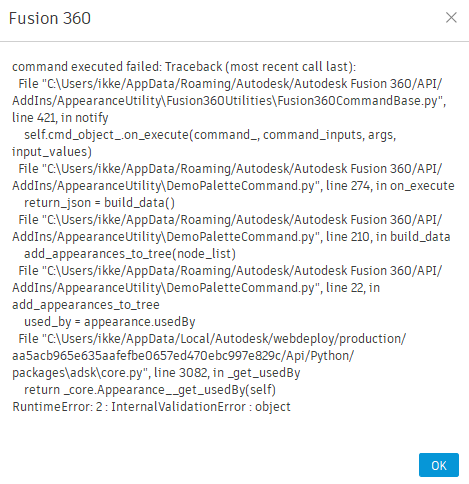
When I open the Appearances Tree of click on the Refresh button, the included error screen is shown. Can you help me in fixing this?
Thank you in advance.
I've installed the utility following the instructions (pull request, unzip, remove the "-master" from the top level folder, copied it to the ...\API\AddIns folder, restarted Fusion 360, enabled the addin).
Please note that my folder path includes the "Roaming" folder as I'm using Windows 11 (I guess the instructions where made on a older Windows OS, which did not include the Roaming/Local folders for Appdata).
When I open the Appearances Tree of click on the Refresh button, the included error screen is shown. Can you help me in fixing this?
Thank you in advance.